QRBELL Blog
Tips, guides, and news about smart doorbell solutions, security, and connected living.
Latest Articles — 67 posts
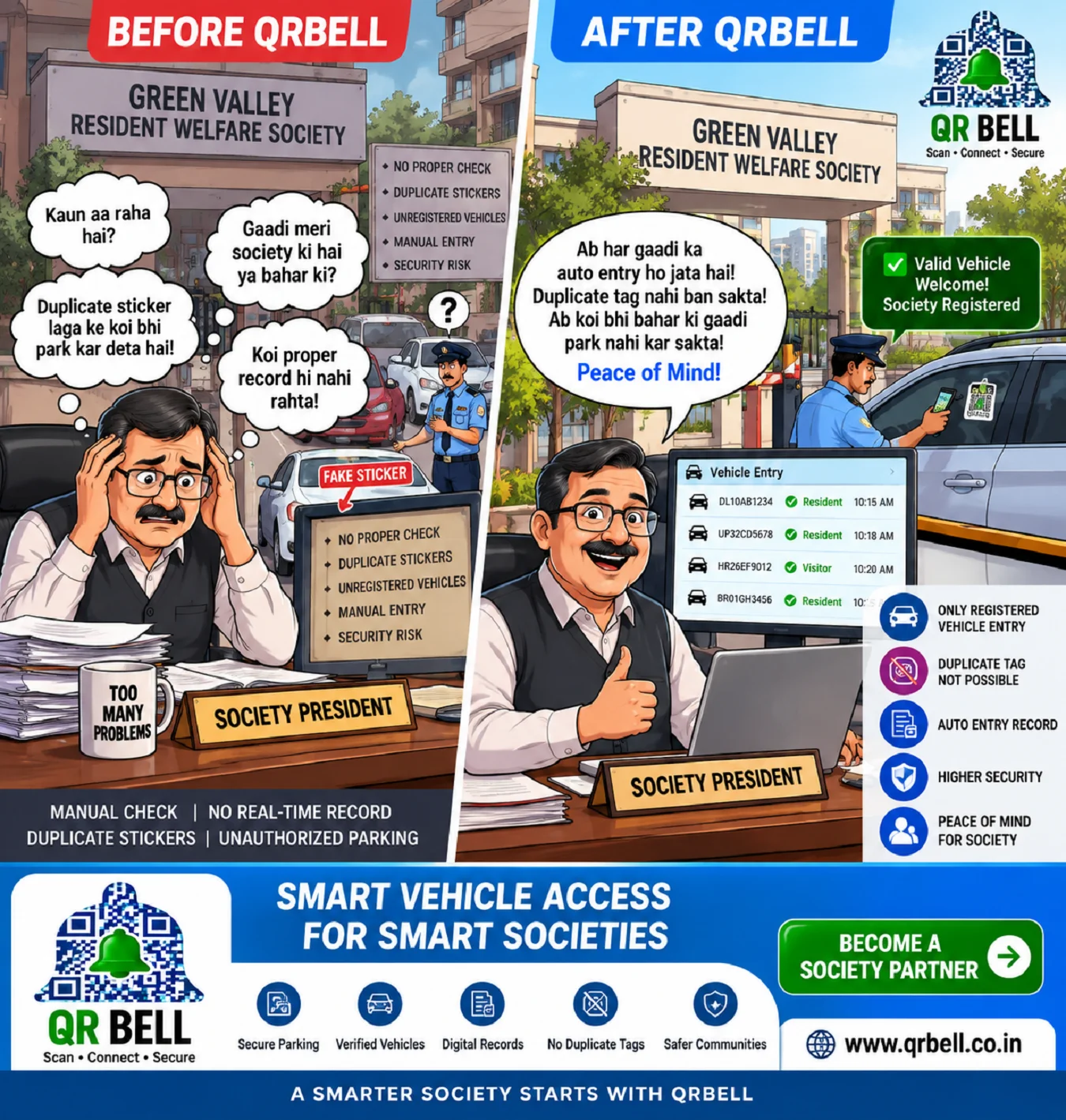
QRBELL Smart Vehicle Access for Societies: A Smarter Way to Manage Vehicles, Parking & Security
QRBELL Smart Vehicle Access for Societies: A Smarter Way to Manage Vehicles, Parking & Security Managing vehicles in a residential society can become a daily challenge. Society management committees, RWA members and security guards often have to deal with questions such as: Is this vehicle registered with the society? Is the vehicle actually owned by a resident? Is someone using a duplicate or unauthorized sticker? Which vehicle entered the society and when? Which vehicles belong to visitors? Who is parking where? How can vehicle records be maintained more efficiently? Traditional physical stickers can help with basic identification, but a sticker by itself does not provide a complete digital record or verification system. This is where QRBELL Smart Vehicle Access aims to bring a new approach. 🚗 QRBELL – From Physical Stickers to Connected Vehicle Access QRBELL uses QR-based technology to create a digital connection between a vehicle and its relevant information. The concept is simple: Vehicle → QR Tag → Scan → Digital Verification → Record Instead of depending only on the appearance of a sticker, a society can use a QR-based system as an additional layer for vehicle identification and access management. The objective is to make vehicle management more organized, connected and digitally manageable. 🏢 The Problem With Traditional Society Vehicle Management Imagine a society with hundreds of cars and bikes. Every resident receives a physical parking sticker. Over time, several challenges can arise. 1. Duplicate Stickers A physical sticker can potentially be copied or reproduced. Someone may attempt to place a similar-looking sticker on another vehicle, making visual verification more difficult. 2. Manual Verification Security guards may have to visually check stickers and manually confirm whether a vehicle belongs to a resident. 3. Limited Vehicle Information A physical sticker normally cannot provide a complete digital history of the vehicle. 4. Visitor Management Visitor vehicles require a separate verification and entry process. 5. Parking Management Society management may need better visibility into registered vehicles, visitor vehicles and parking activity. 6. Record Keeping Maintaining everything through physical registers can become difficult as the number of residents and vehicles increases. 🔔 How QRBELL Changes the Approach QRBELL introduces a Connected Vehicle Tag concept.
Read Article
QRBELL -Drive Mode: Smart Emergency Assistance After a Road Accident
QRBELL AI Drive Mode: Smart Emergency Assistance After a Road Accident A road accident can happen within seconds, but the consequences can last a lifetime. In many serious accidents, the people involved may be injured, unconscious, frightened, or unable to make an emergency call themselves. This is where QRBELL’s AI-powered emergency assistance vision can make a meaningful difference. QRBELL is working toward a smart Drive Mode designed to help connect an accident situation with family members, emergency contacts, hospitals, ambulance services and police through automated alerts and communication. 🚨 “जब आप बोल न पाएं, QRBELL AI आपकी आवाज़ बनेगा।” The idea is simple: when an accident is detected while Drive Mode is active, the system can initiate the configured emergency-response process so that help can be contacted without depending entirely on the injured person manually making a call. What Is QRBELL AI Drive Mode? QRBELL Drive Mode is envisioned as a smart vehicle-safety feature that can work while a user is driving a car or riding a bike. The system is designed around the idea of combining: 🤖 AI-based assistance 🚗 Vehicle connectivity 📞 Emergency calling 📍 Location information 👨👩👧 Family alerts 🚑 Ambulance communication 🏥 Hospital-related communication 🚓 Police communication 🔔 Continuous emergency status updates The objective is to create a more connected emergency-response experience. 🆘 What Happens When an Accident Occurs? The proposed QRBELL Drive Mode emergency workflow can work around several stages. 1. 🚗 Accident Detection When Drive Mode is active and the system detects an accident through the supported technology and connected device, the emergency workflow can be initiated. 2. 🔔 Emergency Alarm The system can trigger an alert/alarm to indicate that an emergency situation has been detected. 3. 📞 Emergency Calls The system can initiate calls or alerts to the configured emergency contacts according to the final product configuration. 4. 👨👩👧 Family Alert The user's designated family or emergency contacts can receive an alert regarding the emergency. 5. 📍 Location Sharing Relevant location information can be shared with authorized contacts or services, subject to device permissions and connectivity. 6. 🚑 Emergency-Service Coordination Where supported and technically available, the system can help communicate with ambulance, hospital and police services. 7. 🤖 AI Voice Assistance AI can potentially communicate emergency information and provide status updates through the configured system. For example: “Emergency detected. Help has been notified.” or: “Emergency assistance is being coordinated.” 8. 💬 Continuous Updates The vision goes beyond making one emergency call. The AI system can potentially continue communicating status information so that the user or people around them know that the emergency response process has been activated. ❤️ Why Continuous Communication Matters In an emergency, people often experience confusion and uncertainty. A simple notification such as: “Help has been notified.” can provide important reassurance to people at the scene or family members waiting for information. The QRBELL concept is therefore not only about calling for help, but also about keeping relevant people informed throughout the emergency-response process where technically possible. 📞 One Accident, Multiple Emergency Connections A major part of the QRBELL vision is connecting multiple parties rather than relying on a single emergency contact. Depending on the final implementation, the system may be designed to connect relevant parties such as: Vehicle/User → AI → Family → Emergency Contacts → Hospital → Ambulance → Police This connected approach can help reduce delays caused by manual communication. 🚑 QRBELL and Ambulance Assistance In a serious road accident, reaching medical assistance quickly can be critical. QRBELL's planned emergency-response concept aims to help communicate relevant accident information to emergency services where supported. Potential information can include: Emergency status Vehicle/user information Location Emergency contact details Relevant alerts The actual availability and response time will depend on network connectivity, device permissions, emergency-service infrastructure and the final QRBELL implementation. 🏥 Hospital Communication The QRBELL emergency ecosystem can also be designed to help connect accident situations with appropriate medical assistance. The broader goal is to reduce the communication gap between: Accident → Emergency Alert → Medical Assistance If a suitable hospital/emergency-service integration is available, relevant information can be communicated through the supported system. 🚓 Police Notification Road accidents may also require police assistance. Where supported, QRBELL's emergency workflow can help communicate the emergency situation and relevant information to police or appropriate authorities. This can be particularly useful when the people involved are unable to make the necessary calls themselves. 👨👩👧 Family Emergency Alert For many people, the first concern after an accident is: “Does my family know what happened?” QRBELL aims to address this concern through emergency contact alerts. When the emergency workflow is triggered, configured family or emergency contacts can potentially receive the relevant alert and location information. This can help family members become aware of the situation sooner. 🤖 Why Use AI in Emergency Assistance? AI can potentially make emergency communication more intelligent. Instead of simply generating a notification, AI can help manage communication flows and provide status-based information. For example: Accident Detected ↓ Emergency Alert Triggered ↓ Family Contacted ↓ Emergency Assistance Requested ↓ Location Shared ↓ Response Status Updated The goal is to make the communication process more automated and easier to understand. 🗣️ “Help Is Coming” – A Different Approach to Emergency Technology One of the key ideas behind QRBELL is that emergency technology should not stop after sending an alert. Imagine an accident victim who is unable to communicate. Instead of silence, the system could provide useful updates such as: “Emergency contact has been notified.” “Your location has been shared.” “Emergency assistance has been requested.” “Help is being coordinated.” Such communication can potentially reduce uncertainty during a stressful situation. 🚗 QRBELL Drive Mode for Cars and Bikes The Drive Mode concept is particularly relevant to: 🚘 Car Owners Drivers can use a connected emergency system while travelling. 🏍️ Bike Riders Motorcycle riders can benefit from automated emergency communication because serious accidents can leave riders unable to manually contact their families. 🚕 Commercial Vehicles Future applications could potentially extend to taxis, delivery vehicles, fleet vehicles and other commercial transportation. 🔐 Privacy and Security Emergency technology involves highly sensitive information, especially location and personal contact details. Therefore, privacy and security should remain an important part of the QRBELL ecosystem. The platform should be designed around appropriate access controls and responsible handling of emergency information. Users should also: Keep device permissions properly configured Maintain updated contact information Keep their phone charged Ensure mobile connectivity when possible Use official QRBELL services Never share passwords or OTPs Review emergency settings periodically 🌐 QRBELL Is Building a Larger Smart Safety Ecosystem QRBELL is not limited to one emergency feature. Its broader ecosystem includes concepts around: 🚗 Vehicle Tags 🏍️ Bike Connectivity 🏠 Doorbell Tags 🔎 Lost & Found 👦 Child Tags 👴 Senior Citizen Tags 🧳 Baggage Tags 🔑 Key Tags 💼 Briefcase Tags 🚨 Emergency Tags 💬 Single Chat 👥 Group Chat 🤖 AI-powered emergency assistance The larger vision is to create a connected environment where people, vehicles, homes and belongings can communicate through smart QR technology. 🚀 A Future Where Technology Can Act When You Cannot The most important idea behind QRBELL's emergency technology is simple: What happens when the person needing help cannot make the call? Traditional emergency systems often depend on someone manually contacting family members or emergency services. QRBELL's future-facing approach is to automate as much of that communication process as technically possible. That means the technology can potentially become an active participant in the emergency workflow rather than merely being a passive QR code. 🔮 Many More Future Features QRBELL's technology ecosystem is continuously evolving. Future developments may introduce additional features designed to make the platform more useful for: Road safety Vehicle owners Families Emergency communication Smart homes Businesses Personal belongings Community connectivity The ultimate goal is to develop technology that is not only innovative but also practical and genuinely useful in real-life situations. ❓ Frequently Asked Questions (FAQ) 1. What is QRBELL Drive Mode? QRBELL Drive Mode is a planned smart vehicle-safety feature designed to support automated emergency communication when an accident is detected while Drive Mode is active. 2. Can QRBELL automatically call family members after an accident? The planned system is intended to initiate configured emergency calls or alerts when an accident is detected, subject to the final implementation, device permissions and connectivity. 3. Can QRBELL share the accident location? The system is designed to support relevant location sharing with authorized contacts or services, subject to permissions and network availability. 4. Can QRBELL contact an ambulance? The planned emergency workflow aims to support communication with ambulance/emergency services where the relevant integration and service availability exist. 5. Can QRBELL contact a hospital? Hospital-related communication may be supported where the appropriate QRBELL integration or emergency-service connection is available. 6. Can QRBELL notify the police? Where supported, the emergency workflow can facilitate communication with police or appropriate authorities. 7. Will QRBELL keep giving updates after an accident? The planned AI concept includes continuous status communication so that relevant users can receive updates during the emergency process, subject to system availability. 8. Does QRBELL replace an ambulance or police service? No. QRBELL is intended to support emergency communication and should not be treated as a replacement for professional emergency services. 9. Does the system require an internet/mobile connection? Automated communication and location features generally depend on device capabilities, network connectivity, permissions and the final implementation. 10. Is the QRBELL emergency system already fully available? Specific emergency capabilities may depend on the stage of product development and final implementation. Users should check the official QRBELL website for current availability. ⚠️ Important Safety Note QRBELL's AI emergency assistance is a technology concept aimed at improving emergency communication. Accident detection accuracy, automatic calls, location sharing, AI communication and coordination with hospitals, police or ambulance services depend on the final system, compatible devices, permissions, network connectivity and availability of external emergency services. In a genuine emergency, users should always contact the appropriate official emergency service directly whenever possible. Conclusion A road accident can happen without warning, and in those critical moments a person may not be able to pick up their phone and ask for help. QRBELL's AI-powered Drive Mode is being developed around a powerful idea: “जब आप बोल न पाएं, QRBELL AI आपकी आवाज़ बनेगा।” From accident detection and emergency alerts to family communication, location sharing and coordination with relevant emergency services, the vision is to create a connected emergency-response ecosystem that can act quickly when manual communication may not be possible. QRBELL is working toward a future where technology doesn't simply tell you that an emergency has happened—it can help connect the right people and services when every second matters. 🔔 QRBELL — Scan • Connect • Secure 🌐 Official Website: www.qrbell.co.in 📲 WhatsApp: 9210911860 By INDIA TAX INFO PRIVATE LIMITED
Read Article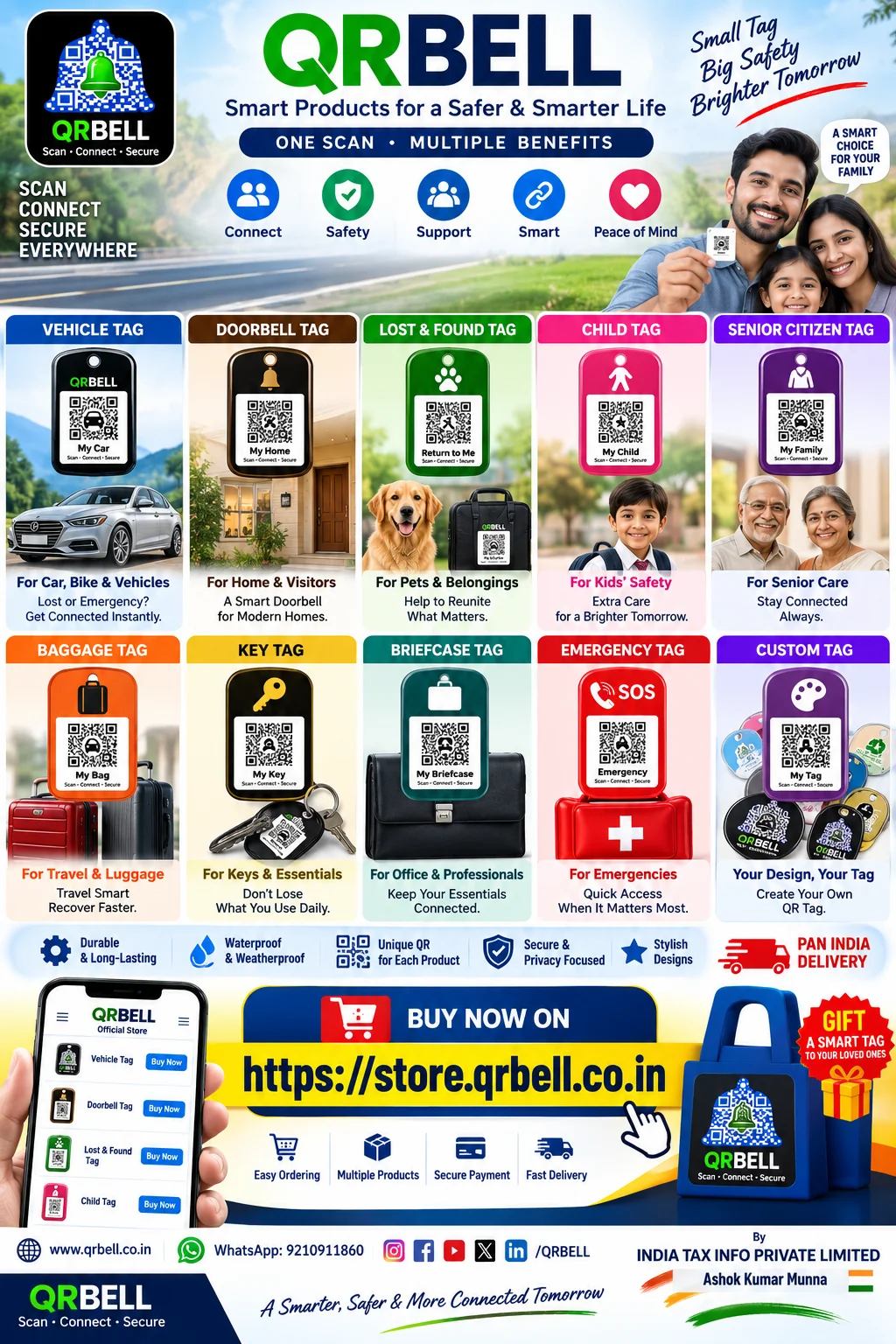
QRBELL Store Smart QR Tags: One Smart Solution for Vehicles, Homes, Luggage, Keys & Everyday Belongings
QRBELL Smart QR Tags: One Smart Solution for Vehicles, Homes, Luggage, Keys & Everyday Belongings In a world where everything is becoming smarter and more connected, even everyday objects can benefit from digital technology. QRBELL brings QR-based connectivity into daily life with a range of Smart QR Tags designed for vehicles, homes, luggage, children, senior citizens, personal belongings and emergency situations. The idea behind QRBELL is simple: Scan • Connect • Secure Users can choose the QRBELL Tag that matches their needs, set it up, place it on the relevant object or location, and use QR-based scanning to access the applicable communication features. Whether it is your Car, Bike, Home Gate, Luggage, Briefcase, Keys or another important belonging, QRBELL aims to make smart connectivity more convenient. What Are QRBELL Smart QR Tags? QRBELL Smart QR Tags are QR-based tags created for different everyday use cases. Instead of relying only on traditional labels or contact information, a QRBELL Tag can provide a digital way for people to interact with the relevant QRBELL service. The tags can be useful for: Vehicles Homes and doors Lost & Found Children Senior citizens Luggage and bags Keys Briefcases Emergency-related use cases Custom applications The exact functionality depends on the particular QRBELL product and the features configured by the user. 🚗 1. QRBELL Vehicle Tag Cars and bikes are among the most useful places for a Smart QR Tag. A QRBELL Vehicle Tag can be placed at a suitable location on a car, bike or other vehicle. When someone needs to communicate with the vehicle owner through the available QRBELL functionality, the QR code provides a digital connection point. Potential everyday applications include: Vehicle-related communication Parking communication Owner contact Emergency-related communication Smart vehicle identification QR-based connectivity Instead of putting personal information openly on a vehicle, a QR-based approach can provide a more convenient digital communication method. 🔔 2. QRBELL Doorbell Tag QRBELL can also be used around homes and offices. A Doorbell Tag can provide visitors with a QR-based way to interact with the relevant service. It can be particularly useful for: 🏠 Homes 🏡 Farmhouses 🏢 Offices 🏘️ Apartments 🚪 Gates and entrances The concept is to make visitor communication more connected while keeping convenience and privacy in mind. 🔎 3. QRBELL Lost & Found Tag Losing a valuable belonging can be stressful. A Lost & Found Tag can provide a QR-based identification and communication option for suitable belongings. It can be used with items such as: Bags Luggage Personal belongings Accessories Important items Other suitable possessions If an item is found, the QR code can provide a way to access the applicable QRBELL communication feature. This can make the process of returning a lost item more convenient. 👦 4. QRBELL Child Tag Parents and guardians often look for additional ways to stay connected with children. A Child Tag can be used as a QR-based connectivity solution for suitable child-safety and communication applications. The concept can be useful for: School-going children Family outings Travel Crowded places Everyday family connectivity QRBELL is designed to provide a digital connection point rather than simply displaying personal information publicly. 👴 5. QRBELL Senior Citizen Tag Senior citizens may also benefit from simple and accessible connectivity solutions. A Senior Citizen Tag can provide a QR-based connection option for suitable family and support-related use cases. It can be useful for families who want an additional digital connection mechanism for elderly family members. 🧳 6. QRBELL Baggage Tag Travelers frequently carry luggage through airports, railway stations, hotels and other busy locations. A QRBELL Baggage Tag can provide a smart QR-based identification and communication option for luggage. It can be placed on: 🧳 Suitcases 🎒 Backpacks 👜 Travel Bags 📦 Other suitable baggage The goal is to make luggage more digitally connected while traveling. 🔑 7. QRBELL Key Tag Keys are small, important and easy to misplace. A QRBELL Key Tag can be used for suitable key-related identification and communication applications. It provides another example of how QR technology can be attached to everyday objects that people normally carry with them. 💼 8. QRBELL Briefcase Tag Professionals can use a Briefcase Tag for suitable office and personal belongings. A QRBELL Tag can be attached to a briefcase, work bag or other professional item to provide a QR-based communication point. This can be particularly useful for people who regularly travel with important work belongings. 🚨 9. QRBELL Emergency Tag Emergency situations require quick access to relevant information and communication. QRBELL offers an Emergency Tag designed for suitable emergency-related applications. Depending on the configured service, it can provide quick access to relevant communication features. However, QRBELL should not be considered a replacement for professional emergency services. In a serious emergency, users should contact the appropriate emergency service immediately. 🎨 10. QRBELL Custom Tag One of the interesting possibilities of QRBELL is customization. Users can create or choose a QR Tag according to their requirements and, where supported, download the QR image for printing. The basic process is: Create → Download → Print → Place → Scan & Connect This allows users to create physical QR Tags for different suitable applications. 🛒 Buy QRBELL Products Online QRBELL products are available through the official QRBELL Store. Users can explore the available products and choose a Tag according to their requirements. 🛍️ Official QRBELL Store store.qrbell.co.in For information about QRBELL and its services: www.qrbell.co.in 📱 Why Use a QRBELL Smart Tag? A Smart QR Tag can offer several practical advantages: ✅ Easy to Use The basic concept is simple: scan the QR and access the applicable digital service. ✅ Multiple Use Cases Different Tags can be used for vehicles, homes, luggage, children, senior citizens and personal belongings. ✅ Physical + Digital Connection A physical Tag can connect an everyday object with a digital platform. ✅ Convenient Communication QR-based interaction can reduce the need to display extensive personal information publicly. ✅ Flexible Applications Users can select Tags according to their specific requirements. ✅ Future-Ready Technology QR technology provides a foundation for developing new digital services and everyday connectivity solutions. 🌐 One QRBELL Ecosystem, Many Possibilities QRBELL's broader vision is to create a connected ecosystem where QR technology can be useful across different areas of everyday life. The concept can connect: People → Vehicles → Homes → Belongings → Businesses → Services This makes QRBELL more than simply a QR code printed on a sticker. It is an approach toward making everyday objects part of a smarter digital ecosystem. 🚀 The Future of QRBELL QRBELL is continuing to develop its platform with the goal of introducing more useful services and applications in the future. As QR technology continues to evolve, Smart QR Tags could become useful across many additional areas, including transportation, personal belongings, homes, businesses, emergency-related communication and other everyday applications. The vision is straightforward: One Tag • Multiple Benefits • Smarter Everyday Life How to Get Started With QRBELL Getting started can be simple: Step 1: Choose Your Tag Select the QRBELL product that matches your requirement. Step 2: Purchase Order your preferred product through the official QRBELL Store. Step 3: Set Up Configure the Tag according to the available QRBELL features. Step 4: Place the Tag Attach it to your Car, Bike, Home Gate, Luggage, Briefcase, Keys or other suitable item. Step 5: Scan & Connect Use QR scanning to access the applicable QRBELL service. Frequently Asked Questions (FAQ) What is QRBELL? QRBELL is a QR-based platform focused on smart connectivity and communication for everyday applications. What products does QRBELL offer? QRBELL offers different Smart QR Tag solutions, including Vehicle, Doorbell, Lost & Found, Child, Senior Citizen, Baggage, Key, Briefcase, Emergency and Custom Tags. Can I use QRBELL on my car or bike? Yes, QRBELL offers Vehicle Tag solutions designed for suitable car, bike and vehicle-related applications. Can I use QRBELL for luggage? Yes. Baggage Tags are designed for suitable luggage and travel-related applications. Can I put a QRBELL Tag on my home gate? Yes. Doorbell/Home-related QR Tags can be used for suitable home and entrance applications. Can I create a custom QR Tag? Custom QR Tag options are available depending on the QRBELL service and product configuration. Where can I purchase QRBELL products? You can visit the official QRBELL Store: https://store.qrbell.co.in Is QRBELL a replacement for emergency services? No. QRBELL should not replace police, ambulance, fire or other professional emergency services. Always contact the appropriate emergency service in a genuine emergency. Conclusion QR technology is becoming an increasingly familiar part of everyday digital life, and QRBELL is bringing that technology into practical physical applications. From Cars and Bikes to Home Gates, Luggage, Keys, Briefcases, Children and Senior Citizens, Smart QR Tags can provide a convenient digital connection between people and their belongings. The concept is simple: Scan • Connect • Secure If you want to explore QRBELL products, visit the official store: 🛒 store.qrbell.co.in 🌐 www.qrbell.co.in QRBELL — Smart Products for a Safer & Smarter Life. By INDIA TAX INFO PRIVATE LIMITED
Read Article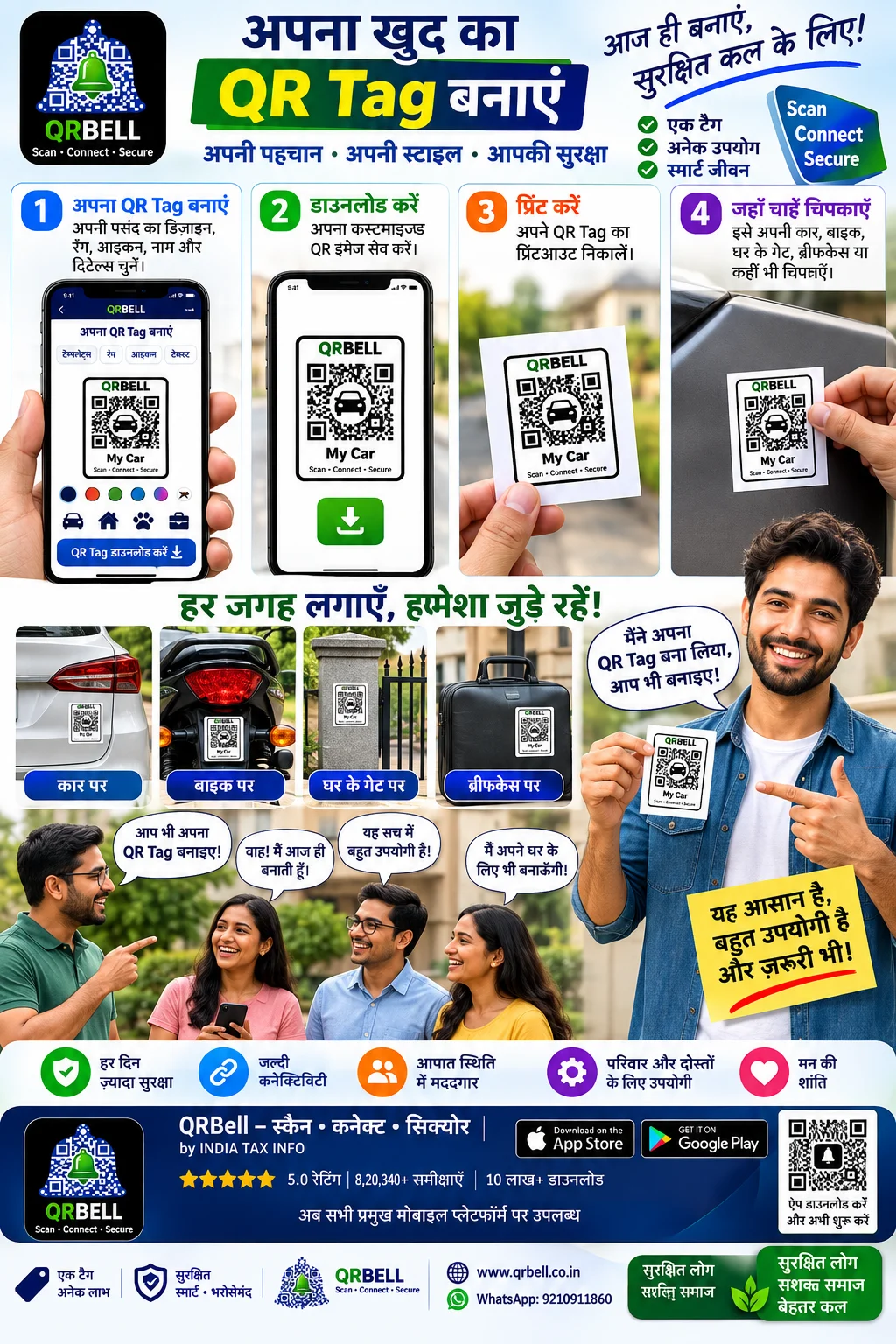
QRBELL: Create, Download and Print Your Own Smart QR Tag for Car, Bike, Home Gate & More
QRBELL: Create, Download and Print Your Own Smart QR Tag for Car, Bike, Home Gate & More In today’s digital world, QR codes have become an easy way to connect the physical world with digital services. From businesses and products to vehicles and personal belongings, QR technology can make information and communication more accessible. QRBELL takes this concept a step further by providing users with a smart QR-based platform where they can create and use QR Tags according to their requirements. The concept is simple: Create → Download → Print → Place → Scan & Connect Whether you want to place a QR Tag on your Car, Bike, Home Gate, Briefcase, Luggage or another important item, QRBELL can provide a convenient way to create a QR-based connection for everyday use. What Is a QRBELL Smart QR Tag? A QRBELL Smart QR Tag is a QR-based identification and communication solution designed for different personal, vehicle, home and business use cases. Instead of keeping a QR code only on a screen, users can download the QR image, print it and physically place it wherever it is required. This makes the QR Tag useful in real-world situations where someone needs to scan the code and access the relevant QRBELL communication experience. Create Your Own QR Tag One of the key advantages of the QRBELL concept is the ability to create a QR image according to the user's requirement. Users can create their QR Tag and then: Create the QR Tag Download the QR image Take a printout Place the printed Tag Allow others to scan and connect This provides a simple bridge between a physical object and a digital communication platform. 🚗 QRBELL QR Tag for Cars A car can be an ideal place for a QR Tag. A QRBELL Tag can be placed at a suitable visible location on a vehicle so that, where applicable, another person can scan it and access the relevant communication options. Potential use cases can include: Vehicle-related communication Contacting the vehicle owner Parking-related communication Emergency-related communication Vehicle identification Smart QR-based connectivity The exact functionality depends on the QRBELL service and features configured for the particular Tag. 🏍️ QRBELL QR Tag for Bikes Bike owners can also use QRBELL Tags for vehicle-related communication. A printed QR Tag can be placed at a suitable location on the bike and can provide a simple QR-based way to connect with the relevant QRBELL service. This can be particularly useful for everyday bike owners who want a simple digital connection attached to their vehicle. 🏠 QRBELL QR Tag for Home Gates QRBELL can also be used for home and property-related communication. A QR Tag can be placed near a suitable home gate or entrance, depending on the intended use. It can potentially help create communication between visitors and residents through QR-based interaction. This can be useful for: Homes Farmhouses Apartments Offices Properties Private gates 💼 QRBELL QR Tag for Briefcases and Personal Belongings Important personal belongings can also benefit from QR-based identification and communication. A QRBELL QR Tag can be printed and placed on suitable items such as: 💼 Briefcases 🧳 Luggage 🎒 Bags 📦 Packages 📁 Important items 🔑 Other belongings This creates a simple way to attach a digital QR connection to a physical item. 📦 QRBELL for Products and Packaging Businesses can explore QRBELL QR Tags for product packaging and customer communication. A QR code printed on a product can potentially provide customers with access to relevant communication or support options. This can create a more connected customer experience. For example: Product → Scan QR → Access Relevant QRBELL Communication Businesses can use this concept for customer support, product-related communication and other suitable applications. 💬 QRBELL Is More Than Just a QR Code A traditional QR code generally provides access to a specific digital destination. QRBELL's broader vision is to use QR technology as a communication and connectivity gateway. The goal is to connect: 👤 People 🚗 Vehicles 🏠 Homes 💼 Personal belongings 📦 Products 🏢 Businesses 👨👩👧 Families 👥 Communities through a connected QR-based ecosystem. 🔐 Privacy-Focused Communication Privacy is an important consideration in modern digital communication. QRBELL is designed with a privacy-focused approach so users can use QR-based communication without unnecessarily exposing personal information in every situation. Users should always follow good digital security practices, including: Never sharing OTPs with unknown people Protecting account credentials Checking QR codes before scanning Avoiding suspicious links Reviewing application permissions Using official QRBELL services No digital platform should be considered completely risk-free, so responsible usage remains important. 📲 Why Create a Physical QR Tag? A physical QR Tag has an important advantage: it stays with the object. For example, instead of verbally explaining how someone can contact you regarding a vehicle or item, a QR Tag can provide a simple digital entry point. The basic process is: See QR → Scan QR → Connect This can make communication more convenient in appropriate situations. 🚀 QRBELL's Future Vision QR technology continues to become part of everyday life. QRBELL aims to build a broader ecosystem where QR Tags can become useful across multiple areas of everyday communication. The future can bring many additional features and use cases that may make QRBELL even more useful for users, families, vehicle owners, businesses and communities. The vision is to make smart connectivity: Simple. Practical. Accessible. Connected. 🌐 Who Can Use QRBELL QR Tags? QRBELL QR Tags can have applications for many different users. 👤 Individuals For personal belongings and everyday communication. 🚗 Vehicle Owners For cars, bikes and vehicle-related communication. 👨👩👧 Families For connected family and trusted-contact use cases. 🏠 Property Owners For homes, gates, farmhouses and other properties. 🏢 Businesses For customer communication and business connectivity. 📦 Product Manufacturers For product packaging and customer care. 🛍️ Retailers For QR-based customer interaction and communication. ⭐ The Simple QRBELL Process Step 1 — Create Create your QRBELL QR Tag. Step 2 — Download Download the QR image. Step 3 — Print Take a physical printout of the QR Tag. Step 4 — Place Put the QR Tag on your Car, Bike, Gate, Briefcase, Luggage or other suitable item. Step 5 — Scan & Connect When someone scans the QR code, they can access the relevant QRBELL communication experience. ❓ Frequently Asked Questions (FAQ) 1. What is a QRBELL QR Tag? A QRBELL QR Tag is a QR-based communication and connectivity solution that can be used on vehicles, homes, personal belongings, products and other suitable applications. 2. Can I create my own QRBELL QR Tag? Yes, users can create a QR Tag according to the available QRBELL features and requirements. 3. Can I download my QRBELL QR image? Yes, the QR image can be downloaded where the relevant feature is available. 4. Can I print my QRBELL QR Tag? Yes. After downloading the QR image, users can print it and place it on a suitable physical object. 5. Can QRBELL be used on a car? Yes. QRBELL QR Tags can be used for suitable vehicle-related applications, including cars. 6. Can QRBELL be used on a bike? Yes. A QRBELL QR Tag can be used for suitable bike and vehicle-related communication applications. 7. Can I put a QRBELL Tag on my home gate? Yes. QRBELL QR Tags can be used for suitable home, gate and property-related communication use cases. 8. Can I use QRBELL on a briefcase or luggage? Yes. QR Tags can be printed and placed on suitable personal belongings such as briefcases, bags and luggage. 9. Can businesses use QRBELL? Yes. Businesses can explore QRBELL for customer communication, product packaging, business communication and other suitable applications. 10. Is QRBELL a secure communication platform? QRBELL follows a privacy-focused approach to communication. Users should also follow standard digital security practices and protect their account information. 11. Does QRBELL replace emergency services? No. QRBELL should not be considered a replacement for police, ambulance, fire services or professional emergency assistance. In a serious emergency, users should contact the appropriate emergency services immediately. 12. Where can I learn more about QRBELL? Visit the official QRBELL website: 🌐 www.qrbell.co.in For assistance, contact QRBELL on WhatsApp: 📲 9210911860 Conclusion A QR code can be much more than a small square printed on paper. With QRBELL, users can create a QR Tag, download the QR image, print it and place it on everyday objects such as cars, bikes, home gates, briefcases, luggage and other suitable belongings. The simple concept of: Create → Download → Print → Place → Scan & Connect can help bring physical objects into the digital communication ecosystem. QRBELL is working toward a future where QR-based connectivity can become a practical part of everyday life. 🔔 QRBELL — Scan • Connect • Secure 🌐 www.qrbell.co.in 📲 WhatsApp: 9210911860 By INDIA TAX INFO PRIVATE LIMITED
Read Article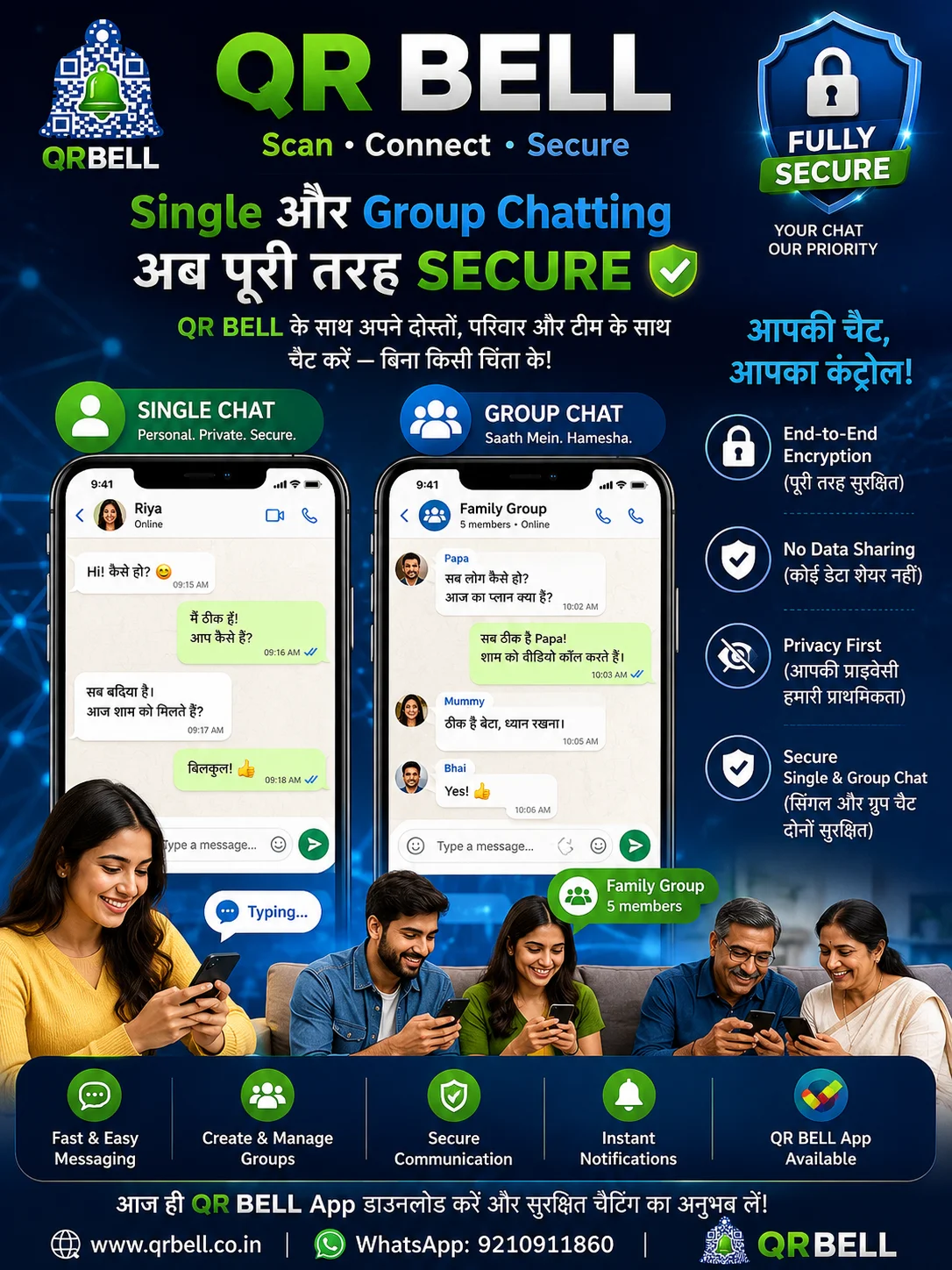
QR BELL Single & Group Chat
QR BELL Single & Group Chat: Smart, Simple और Privacy-Focused Digital Communication आज के digital दौर में communication हमारी daily life का एक महत्वपूर्ण हिस्सा बन चुका है। Family, friends, business teams, customers और communities—हर जगह instant messaging और group communication की जरूरत होती है। लेकिन modern communication में केवल message भेजना ही काफी नहीं है। Users चाहते हैं कि communication आसान होने के साथ-साथ privacy-focused, controlled और convenient भी हो। इसी जरूरत को ध्यान में रखते हुए QR BELL एक smart communication platform के रूप में Single Chat और Group Chat जैसे communication features को एक connected experience में लाने की दिशा में काम करता है। QR BELL — Scan • Connect • Secure 💬 QR BELL Single Chat क्या है? Single Chat का उद्देश्य दो लोगों के बीच direct communication को आसान बनाना है। आप personal conversations के लिए Single Chat का उपयोग कर सकते हैं, जहाँ communication को simple और convenient तरीके से manage किया जा सकता है। Single Chat उपयोगी हो सकता है: 👨👩👧 Family members के बीच communication 👥 Friends के बीच बातचीत 🤝 Business communication 🏢 Team members के बीच direct communication 📞 किसी व्यक्ति से जरूरी information share करने के लिए इसका उद्देश्य communication को unnecessary complexity से बचाकर एक simple digital experience देना है। 👥 QR BELL Group Chat क्या है? जब communication केवल दो लोगों के बीच नहीं बल्कि कई लोगों के साथ करनी हो, तब Group Chat उपयोगी होता है। Family, friends, business teams या किसी community के members एक group में communication कर सकते हैं। Group Chat के संभावित उपयोग 🏠 Family Group परिवार के members एक साथ connected रह सकते हैं। 👨💼 Business Team Group Team members information और updates share कर सकते हैं। 🏢 Office Communication Internal discussions और coordination के लिए group communication उपयोगी हो सकता है। 👥 Community Groups किसी society, organization या community के members के बीच communication को आसान बनाया जा सकता है। 🔐 Privacy-Focused Communication क्यों जरूरी है? आज online communication के साथ privacy एक महत्वपूर्ण concern बन चुका है। Personal conversations में कई बार sensitive information, photographs, documents या important discussions शामिल होते हैं। इसलिए किसी भी communication platform को इस्तेमाल करते समय users को privacy और security को महत्व देना चाहिए। QR BELL का communication experience privacy-focused approach के साथ बनाया गया है। इसका उद्देश्य users को ऐसे communication features देना है जिनके माध्यम से वे अपनी conversations और interactions को बेहतर तरीके से manage कर सकें। Important: कोई भी online platform 100% risk-free होने की guarantee नहीं दे सकता। Users को हमेशा strong passwords, device security और safe digital practices का पालन करना चाहिए। 🛡️ QR BELL में Smart Communication Experience QR BELL केवल traditional messaging concept तक सीमित नहीं है। इसका broader vision QR technology और digital communication को एक connected platform में लाना है। QR BELL ecosystem में अलग-अलग situations के लिए smart communication use cases बनाए जा सकते हैं। उदाहरण के लिए: 🚗 Vehicle communication 🏠 Home & visitor communication 🏢 Business communication 📦 Delivery communication 🅿️ Parking-related communication 🚨 Emergency communication 👨👩👧 Family connectivity 💬 Single Chat 👥 Group Chat इस तरह QR BELL का उद्देश्य real-world situations और digital communication के बीच connection बनाना है। 📱 Single Chat और Group Chat में क्या अंतर है? Feature Single Chat Group Chat Participants 2 people Multiple people Personal conversation ✅ — Family communication ✅ ✅ Team communication Limited ✅ Group discussion ❌ ✅ Information sharing ✅ ✅ Multiple members coordination ❌ ✅ दोनों का अपना अलग उपयोग है और situation के अनुसार user सही communication option चुन सकता है। 🚀 QR BELL का Vision QR BELL का vision सिर्फ QR code scan करने तक सीमित नहीं है। QR technology को smart communication के साथ जोड़कर QR BELL का उद्देश्य लोगों, vehicles, homes, businesses और communities को एक connected communication ecosystem से जोड़ना है। आज QR codes information sharing के लिए widely used हैं। QR BELL इस concept को आगे बढ़ाते हुए QR को communication और connectivity के साथ जोड़ने की दिशा में काम करता है। 🌐 QR BELL किन लोगों के लिए उपयोगी हो सकता है? 👨👩👧 Families Family members के बीच communication और connectivity के लिए। 🚗 Vehicle Owners Vehicle-related communication और alerts के लिए। 🏢 Businesses Customers, visitors और teams के साथ communication के लिए। 🏠 Homes & Apartments Visitor और resident communication के लिए। 📦 Delivery & Logistics Delivery-related communication को आसान बनाने के लिए। 👥 Communities Society और community-level communication के लिए। 🔒 Secure Communication के लिए Users को क्या ध्यान रखना चाहिए? QR BELL या किसी भी digital communication platform का इस्तेमाल करते समय कुछ basic security practices हमेशा follow करें: ✅ केवल official website/app का उपयोग करें। ✅ Suspicious links पर click न करें। ✅ अपना OTP, password, PIN या banking information किसी के साथ share न करें। ✅ Unknown QR codes और links को verify किए बिना use न करें। ✅ अपने smartphone में screen lock और security updates रखें। ✅ किसी भी suspicious activity की स्थिति में तुरंत उचित action लें। Digital security में technology के साथ-साथ user awareness भी उतनी ही महत्वपूर्ण है। 💡 QR BELL क्यों अलग है? QR BELL का core concept है: Scan → Connect → Secure एक QR code केवल information दिखाने का माध्यम न होकर communication शुरू करने का एक आसान माध्यम बन सकता है। यही concept QR BELL को traditional QR code usage से आगे ले जाने का प्रयास करता है। 📲 QR BELL के साथ Connected Future भविष्य में digital communication और smart QR technology का combination homes, vehicles, offices, businesses और public spaces में communication को और आसान बना सकता है। Single Chat और Group Chat जैसे features इस broader communication ecosystem का एक महत्वपूर्ण हिस्सा हो सकते हैं। QR BELL का लक्ष्य है कि technology को complicated बनाने के बजाय उसे simple, accessible और useful बनाया जाए। ❓ Frequently Asked Questions (FAQ) 1. QR BELL क्या है? QR BELL एक QR-based smart communication platform है, जिसका उद्देश्य QR technology के माध्यम से people, homes, vehicles और businesses को communication सुविधाओं से connect करना है। 2. क्या QR BELL में Single Chat उपलब्ध है? QR BELL communication experience में Single Chat जैसे features शामिल हैं, जिनका उद्देश्य direct communication को आसान बनाना है। 3. Group Chat क्या है? Group Chat के माध्यम से multiple members एक communication group में connected रह सकते हैं और information share कर सकते हैं। 4. QR BELL Group Chat का उपयोग कौन कर सकता है? Family, friends, teams, businesses और communities जैसे groups के लिए Group Chat उपयोगी हो सकता है। 5. क्या QR BELL privacy-focused है? QR BELL को privacy-focused communication approach के साथ design किया गया है। फिर भी users को अपनी personal information और credentials सुरक्षित रखने के लिए standard cybersecurity practices follow करनी चाहिए। 6. क्या QR BELL केवल chatting के लिए है? नहीं। QR BELL का broader concept QR-based communication से जुड़ा है और इसके use cases homes, vehicles, businesses, deliveries, parking और अन्य real-world communication situations तक हो सकते हैं। 7. QR BELL की official website क्या है? QR BELL की official website है: www.qrbell.co.in 8. QR BELL से contact कैसे करें? WhatsApp पर QR BELL से संपर्क कर सकते हैं: +91 9210911860 📢 Conclusion आज के समय में communication को केवल fast नहीं बल्कि smart, convenient और privacy-focused होना भी जरूरी है। QR BELL Single Chat और Group Chat जैसे communication features के माध्यम से लोगों को connected रहने का एक modern digital experience देने की दिशा में काम करता है। चाहे personal conversation हो, family group हो, team communication हो या किसी real-world situation में QR-based communication—QR BELL का vision एक connected digital ecosystem बनाना है। 🔵 QR BELL — Scan • Connect • Secure 🌐 Website: www.qrbell.co.in 📲 WhatsApp: +91 9210911860 India Tax Info Private Limited
Read Article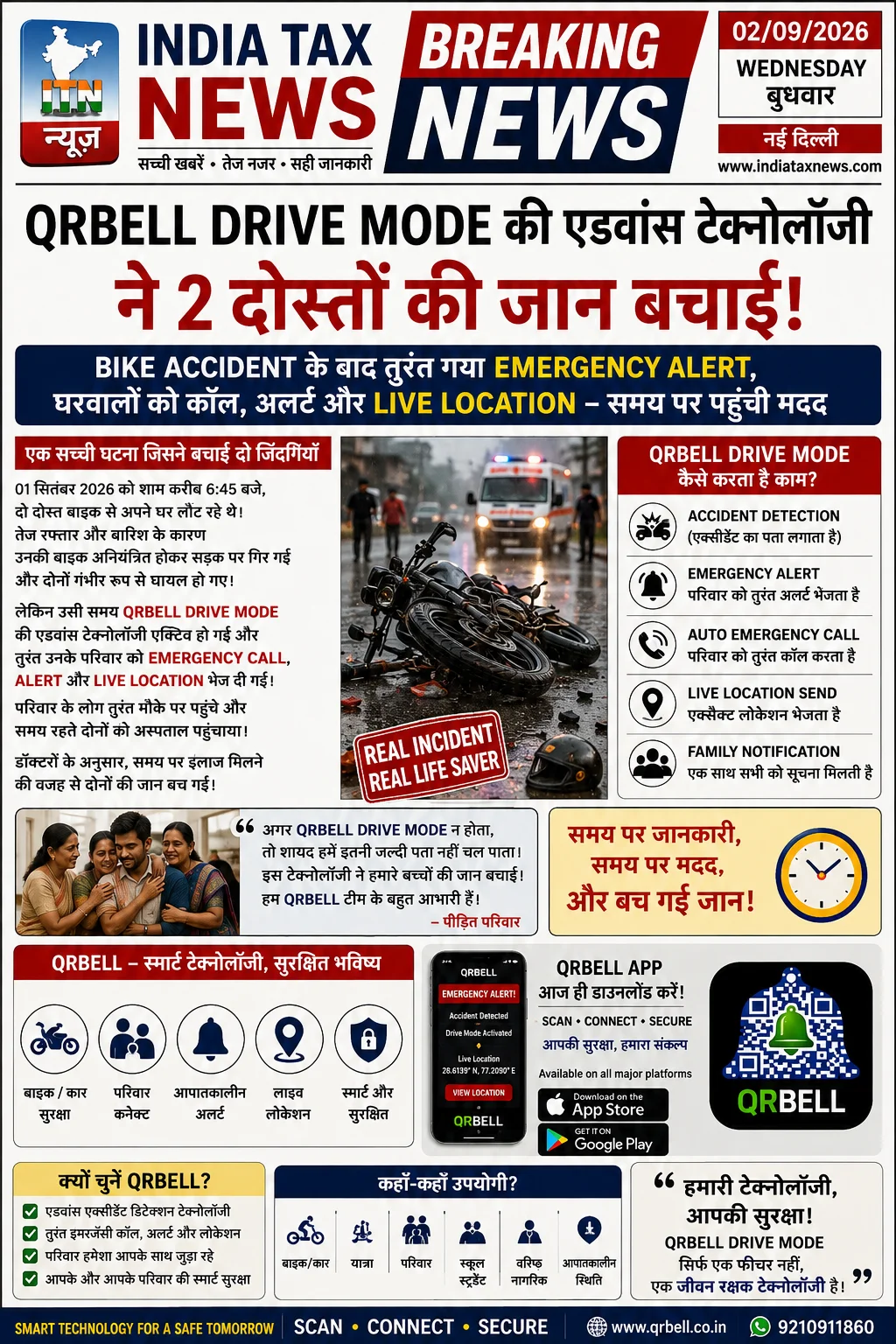
QR BELL Drive Mode: Smart Accident Detection, Emergency Alert, Call & Live Location Support
QR BELL Drive Mode: Smart Accident Detection, Emergency Alert, Call & Live Location Support Road Safety ke Liye Smart Technology ka Naya Approach Aaj ke samay mein bike aur car travel hamari daily life ka important hissa ban chuka hai. Lekin road par safety ka risk kabhi bhi ho sakta hai. Accident ki situation mein sabse badi problem kai baar yeh hoti hai ki injured person khud apne family members ya emergency contacts ko inform nahi kar pata. Aisi emergency situations ko dhyan mein rakhte hue QR BELL Drive Mode ka concept smart technology ke madhyam se emergency communication aur connected safety support provide karne ke liye design kiya gaya hai. QR BELL ka objective hai ki available and configured features ke through emergency situation mein important alerts, communication aur location-related information trusted contacts tak pahunchane mein support mil sake. 🚨 Accident ke Baad Sabse Badi Problem: Family Ko Information Kaise Mile? Sochiye, do dost bike se travel kar rahe hain. Raaste mein achanak accident ho jata hai. Dono injured ho jate hain aur unmein se koi bhi immediately phone use karke apne ghar walon ko inform karne ki condition mein nahi hai. Aisi situation mein family ko yeh pata nahi hota: Accident kab hua? Person kis location par hai? Uski current situation kya hai? Kis hospital ya area mein help ki zarurat hai? Emergency ke samay information ka delay situation ko aur difficult bana sakta hai. Yahin par smart emergency communication technology ka role important ho sakta hai. 🚗 QR BELL Drive Mode Kya Hai? QR BELL Drive Mode QR BELL ecosystem ka ek advanced safety-oriented concept hai, jiska purpose driving ya travelling ke dauran available emergency-related technology aur communication features ke madhyam se users aur unke trusted contacts ko better connected rakhna hai. Available features, user permissions aur account configuration ke according QR BELL Drive Mode emergency situations mein relevant alerts aur information sharing mein support kar sakta hai. ⚡ QR BELL Drive Mode Kaise Help Kar Sakta Hai? 1. Accident Detection Support Available technology aur configured features unusual incident ya possible accident situation ko identify karne mein support kar sakte hain. System ka purpose emergency-related situation ko recognize karne aur available response process ko initiate karne mein help karna ho sakta hai. Actual feature performance device capabilities, app version, permissions, network availability aur user configuration par depend kar sakti hai. 2. Emergency Alert 🔔 Emergency situation ke dauran configured contacts ko alert bhejne ka option available features ke according help kar sakta hai. Isse family members ya trusted contacts ko situation ke baare mein jaldi information mil sakti hai. 3. Emergency Call 📞 Agar emergency calling functionality available aur properly configured hai, to relevant contacts ke saath emergency communication initiate karne mein support mil sakta hai. Emergency communication ka purpose important contacts ko situation ke baare mein jaldi aware karna hai. 4. Live Location Sharing 📍 Location-related features aur user permissions ke according configured contacts ko relevant location information share ki ja sakti hai. Location information family members ko: Person ki approximate ya available location samajhne mein Help arrange karne mein Relevant emergency action lene mein support kar sakti hai. 5. Family Notification 👨👩👧👦 QR BELL ka ek important safety concept trusted contacts aur family communication ko better manage karna hai. Agar emergency contacts properly configured hain, to available notification features ke through important information family members tak pahunch sakti hai. 🏍️ Bike Riders ke Liye Kyon Important Hai? Bike riders road par relatively higher exposure ke saath travel karte hain. Long-distance rides, night travel, highways aur unfamiliar routes ke dauran emergency preparedness important ho sakti hai. QR BELL Drive Mode aur QR-based safety communication ka concept bike riders ke liye useful ho sakta hai, especially jab: Rider akela travel kar raha ho Long-distance journey ho Family members ko emergency contact ke roop mein add kiya gaya ho Location-related permissions properly configured hon Emergency contacts updated hon 🚗 Car Owners ke Liye Smart Safety Support Car users ke liye bhi emergency preparedness important hai. QR BELL ke available vehicle-related QR solutions aur communication features different situations mein useful ho sakte hain. Potential use cases mein shamil ho sakta hai: Vehicle emergency communication Family contact information management Available location-related communication Emergency alert support QR-based vehicle identification or communication options 👨👩👧 Family Safety aur Trusted Contacts Emergency ke samay family members ko information milna bahut important ho sakta hai. QR BELL users ko available Member Management ya Family Management features ke madhyam se trusted contacts ko manage karne ka option mil sakta hai. Users ko apne emergency contacts regularly review karne chahiye aur ensure karna chahiye ki: ✅ Correct mobile numbers added hon ✅ Family members updated hon ✅ Relevant permissions properly configured hon ✅ Emergency-related features samajhkar activate kiye gaye hon ✅ Location permissions available requirements ke according enabled hon 🔐 QR BELL aur Privacy Safety ke saath privacy bhi equally important hai. QR BELL ka objective QR-based communication aur available account controls ke through users ko communication manage karne ke options provide karna hai. Users ko hamesha: Strong passwords use karne chahiye OTP kisi unknown person ke saath share nahi karna chahiye App permissions ko carefully review karna chahiye Unknown QR codes ko blindly scan nahi karna chahiye Emergency contacts ko updated rakhna chahiye 🌐 QR BELL Kahan-Kahan Useful Ho Sakta Hai? QR BELL technology aur available services ke use cases mein shamil ho sakte hain: 🏍️ Bike Safety Emergency communication aur QR-based support. 🚗 Car Safety Vehicle-related communication aur emergency contact support. 👨👩👧 Family Communication Trusted family members aur contacts ke management ke liye. 🧓 Senior Citizens Emergency situations mein configured contacts tak information pahunchane ke available options. 🎓 Students Daily travel aur family communication support. 🏢 Business Use Customer communication, support aur QR-based connectivity. 📦 Product Customer Care Product packaging ya customer support materials par QR-based communication options. 💳 Visiting Cards QR-based smart contact and communication solutions. 🚨 Serious Emergency Mein Kya Karna Chahiye? Kisi bhi serious accident ya medical emergency mein QR BELL ya koi bhi technology emergency services ka replacement nahi hai. Agar kisi ko serious injury hui hai: Turant local emergency services se contact karein. Medical professionals ki help lein. Injured person ko unnecessarily move na karein. Safe location par rehkar professional instructions follow karein. Available emergency communication tools ka use karke family ya trusted contacts ko inform karein. Technology emergency response ko support kar sakti hai, lekin professional medical aur emergency services sabse important hain. 📱 QR BELL App: Scan • Connect • Secure QR BELL ka vision smart QR technology ke madhyam se communication, connectivity aur safety-oriented use cases ko simplify karna hai. Available features aur applicable plans ke according QR BELL ecosystem users ko different QR-based communication options provide kar sakta hai. QR BELL ke major areas mein shamil ho sakte hain: ✅ QR-based Communication ✅ Vehicle QR Tag ✅ Emergency Contact Support ✅ Family Member Management ✅ Available Location Features ✅ Privacy-Focused Communication ✅ Bike & Car Use Cases ✅ Customer Care Communication ✅ Business QR Solutions ✅ Product Packaging QR ✅ Visiting Card QR 🚀 QR BELL Drive Mode Ka Main Purpose QR BELL Drive Mode ka core objective simple hai: “Emergency ke samay important information ko available technology ke through configured trusted contacts tak faster pahunchane mein support karna.” Road safety ke saath emergency preparedness bhi important hai. Smart technology users aur families ko better prepared aur connected rehne mein support kar sakti hai. Frequently Asked Questions (FAQ) 1. QR BELL Drive Mode kya hai? QR BELL Drive Mode ek safety-oriented technology concept hai jo available and configured features ke madhyam se driving ya travelling ke dauran emergency communication aur trusted contact support provide karne mein help kar sakta hai. 2. Kya QR BELL Drive Mode accident detect karta hai? Available technology aur configured features ke according QR BELL possible emergency situations ya unusual incidents ke detection support provide kar sakta hai. Actual performance device capabilities, permissions, network aur available app features par depend karti hai. 3. Accident ke baad QR BELL family ko alert bhej sakta hai? Agar relevant emergency contacts aur notification features available aur properly configured hain, to QR BELL available emergency alert functionality ke through trusted contacts ko information pahunchane mein support kar sakta hai. 4. Kya QR BELL emergency call kar sakta hai? Available app features aur user configuration ke according emergency communication ya calling options configured contacts ke saath communication initiate karne mein support kar sakte hain. 5. Kya QR BELL live location share karta hai? Location-related features user permissions, device settings aur available functionality ke according relevant location information share karne mein support kar sakte hain. 6. Bike riders QR BELL ka use kar sakte hain? Haan. QR BELL ke available vehicle aur safety-oriented solutions bike riders ke liye useful ho sakte hain, especially emergency communication aur configured trusted contact scenarios mein. 7. Car owners QR BELL ka use kar sakte hain? Haan. Car owners QR BELL ke available vehicle-related QR communication aur emergency-oriented features ko applicable functionality ke according use kar sakte hain. 8. QR BELL mein family members ko add kiya ja sakta hai? Available Member Management ya Family Management features ke through users trusted contacts ya family members ko invite aur manage kar sakte hain, subject to the available app features. 9. Kya QR BELL emergency services ka replacement hai? Nahi. QR BELL ek technology platform hai. Serious accident ya medical emergency mein hamesha local emergency services aur qualified medical professionals se turant help leni chahiye. 10. QR BELL use karne ke liye kya emergency contacts configure karna zaroori hai? Emergency communication features ke liye relevant contacts aur required settings ko properly configure karna important ho sakta hai. Available process app version aur feature settings par depend karega. Conclusion Road par safety aur emergency preparedness dono important hain. Accident kabhi bhi ho sakta hai, aur kai baar injured person khud family members ko inform nahi kar pata. Aisi situations mein QR BELL Drive Mode jaise smart technology concepts available alerts, emergency communication aur location-related features ke madhyam se users aur trusted contacts ko better connected rakhne mein support kar sakte hain. Samay Par Information. Samay Par Action. Better Preparedness. QR BELL – Scan • Connect • Secure 🌐 Website: www.qrbell.co.in 📱 WhatsApp / Contact: 9210911860
Read Article