QRBELL Blog
Tips, guides, and news about smart doorbell solutions, security, and connected living.
Tagged “QR Bell India” — 7 posts
Clear tag filter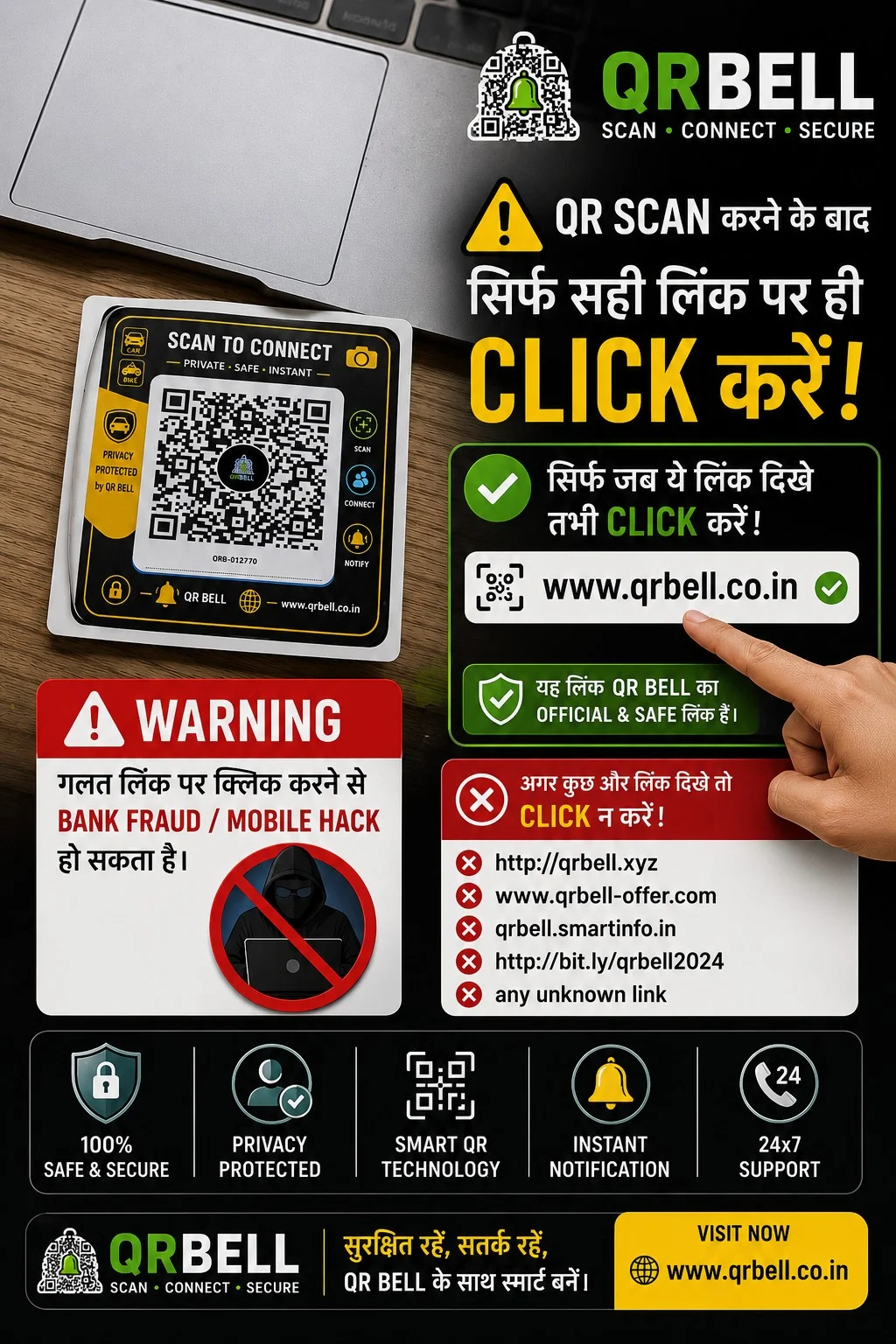
QR BELL QR Code Safety Guide: QR Scan के बाद सही Link पर ही Click क्यों करें?
QR BELL QR Code Safety Guide: QR Scan के बाद सही Link पर ही Click क्यों करें? आज QR Code हमारी रोजमर्रा की जिंदगी का हिस्सा बन चुका है। Shopping, payment, websites, product information, digital contact, parking और कई दूसरी सेवाओं के लिए लोग QR Code का इस्तेमाल करते हैं। लेकिन हर QR Code और हर QR-generated link को बिना जांचे खोलना सुरक्षित नहीं माना जा सकता। इसीलिए QR BELL users के लिए एक महत्वपूर्ण बात समझना जरूरी है: QR Scan करने के बाद किसी भी Link पर तुरंत Click न करें। पहले Link को ध्यान से Verify करें। QR BELL का उद्देश्य “Scan • Connect • Secure” के साथ smart और privacy-focused communication उपलब्ध कराना है। QR BELL के official platform पर QR-based contact और connectivity solutions उपलब्ध हैं। SEO Meta Information Meta Title QR BELL QR Code Safety: Scan के बाद सही Link कैसे पहचानें? | QR Scam से बचें Meta Description QR BELL QR Code scan करने के बाद सही website link कैसे पहचानें? QR scam, phishing, fake links और online fraud से बचने के लिए जरूरी QR Code safety tips जानें। Focus SEO Keywords QR BELL, QR Bell QR Code, QR Bell safety, QR Bell security, QR code safety, QR code scam, QR code fraud, QR scan safety, QR link safety, fake QR code, fake QR link, phishing link, QR code phishing, QR code fraud prevention, QR code security tips, safe QR scanning, QR Bell official website, QR Bell India, smart QR technology, secure QR communication, QR code mobile security, QR code bank fraud, QR code online fraud, QR scan करने के बाद क्या करें, QR code पर click करने से पहले क्या देखें Suggested URL Slug /qr-bell-qr-code-safety-fake-link-scam-prevention QR BELL क्या है? QR BELL – Scan • Connect • Secure एक smart QR-based communication और connectivity platform है। QR BELL का उपयोग विभिन्न situations में किया जा सकता है, जैसे: 🚗 Vehicle Contact 🏍️ Bike Contact 🏠 Home & Door Communication 🏢 Office & Business Contact 📇 Digital Visiting Card 🅿️ Parking Communication 🐾 Pet & Lost & Found 🆘 Emergency Communication 📦 Product/Asset Contact QR BELL का उद्देश्य लोगों को QR Code के माध्यम से convenient communication option देना है, ताकि जरूरत पड़ने पर contact किया जा सके और unnecessary personal number sharing को कम किया जा सके। QR Scan करने के बाद सबसे जरूरी सावधानी QR Code scan करना अपने आप में कोई समस्या नहीं है। समस्या तब हो सकती है जब scan करने के बाद user बिना जांचे किसी suspicious link, website, payment page या download page पर चला जाए। Reserve Bank of India भी लोगों को unknown sources से मिले QR Codes scan करने या unknown links पर click करने से सावधान रहने की सलाह देता है। इसलिए QR scan करने के बाद: पहले Link देखें → फिर Website पहचानें → फिर आगे बढ़ें। QR BELL का सही Official Website Link कैसे पहचानें? QR BELL से संबंधित जानकारी के लिए official website है: www.qrbell.co.in QR BELL Official Website यदि QR BELL के नाम से कोई अलग या suspicious domain दिखाई देता है, तो उसे तुरंत official मानकर click न करें। Domain spelling ध्यान से देखें। उदाहरण के लिए: ✅ Official www.qrbell.co.in ⚠️ Suspicious हो सकता है qrbell-offer.example qrbell-login.example qrbell-free.example किसी shortened URL का unknown destination QR BELL जैसा दिखने वाला लेकिन अलग domain नोट: किसी specific domain को scam कहना तभी उचित है जब उसकी स्वतंत्र पुष्टि हो। इसलिए unknown domain को केवल “suspicious/unverified” मानकर verify करना बेहतर है। QR Code Scan करने के बाद क्या-क्या Check करें? 1. Website का Domain देखें सबसे पहले browser में दिखाई देने वाला domain check करें। क्या spelling सही है? क्या domain वही है जिसे आप खोलना चाहते थे? क्या website का नाम suspicious तरीके से बदला हुआ तो नहीं? 2. HTTPS और Browser Warning देखें Website खोलते समय browser की security warning को ignore न करें। अगर browser कहता है कि: “Your connection is not private” या कोई security warning आती है, तो आगे जाने से पहले रुकें। 3. Unknown Link पर तुरंत Click न करें यदि QR scan के बाद कई links दिखाई देते हैं, तो हर link पर click करने की जरूरत नहीं है। पहले देखें: यह link किस website पर ले जा रहा है? क्या QR Code से Bank Fraud हो सकता है? यहां एक महत्वपूर्ण अंतर समझना जरूरी है। हर QR Code payment QR नहीं होता। QR Code अलग-अलग information या actions के लिए इस्तेमाल हो सकता है। लेकिन fraudulent QR Codes का इस्तेमाल financial scams में भी किया जा सकता है। RBI ने specifically चेतावनी दी है कि fraudsters लोगों को QR Code scan करवाकर financial transactions authorize करवाने की कोशिश कर सकते हैं। RBI यह भी बताता है कि पैसा receive करने के लिए QR scan करना या UPI PIN डालना जरूरी नहीं है। इसलिए: ❌ “पैसा receive करने के लिए यह QR scan करें” जैसे instructions पर सावधान रहें। ❌ “Refund पाने के लिए UPI PIN डालें” ऐसा होने पर तुरंत रुकें। ❌ “Cashback पाने के लिए OTP बताएं” OTP कभी share न करें। QR Code Scan करने से Mobile Hack हो जाता है? सिर्फ QR Code scan करना अपने आप mobile hack होने के बराबर नहीं है। लेकिन QR Code के माध्यम से user को: malicious website phishing page fake login page suspicious download fraudulent payment page पर ले जाने की कोशिश हो सकती है। इसलिए QR Code scan करने के बाद आप क्या खोलते हैं और क्या information देते हैं, यह बहुत महत्वपूर्ण है। RBI भी suspicious links पर click न करने और passwords, PIN, OTP तथा CVV जैसी sensitive information share न करने की सलाह देता है। QR BELL Users के लिए Simple Safety Rule 🟢 SCAN QR Code scan करें। 🟡 CHECK Scan के बाद आने वाले website/link को ध्यान से देखें। 🔴 STOP अगर domain या request suspicious लगे तो आगे न बढ़ें। 🟢 CONNECT केवल verified और intended service पर ही आगे बढ़ें। कौन-सी जानकारी कभी Share नहीं करनी चाहिए? किसी भी unknown व्यक्ति या suspicious website को ये information न दें: ❌ UPI PIN ❌ ATM PIN ❌ OTP ❌ CVV ❌ Internet Banking Password ❌ Card Password ❌ Banking Login Credentials Cyber Crime Portal और RBI की safety guidance भी sensitive banking credentials share न करने की सलाह देती है। QR BELL का Privacy-Focused Communication Concept QR BELL का एक प्रमुख उद्देश्य smart communication को privacy के साथ जोड़ना है। उदाहरण के लिए यदि किसी vehicle owner को अपना personal number publicly display नहीं करना है, तो vehicle पर QR BELL QR Tag लगाया जा सकता है। किसी व्यक्ति को vehicle से संबंधित communication करना हो तो वह QR-based communication mechanism का उपयोग कर सकता है। इसी तरह QR BELL का concept: Visiting Card Office Home Vehicle Parking Business Pet Lost & Found जैसे use cases में इस्तेमाल किया जा सकता है। QR BELL Vehicle QR Tag Vehicle पर QR BELL लगाने का एक उपयोग यह है कि vehicle से संबंधित व्यक्ति तक communication पहुंचाने का additional digital माध्यम उपलब्ध हो। उदाहरण: 🚗 Wrong Parking 🚨 Emergency 🔧 Vehicle Breakdown 📞 Vehicle Owner Contact इससे vehicle owner को हर जगह personal mobile number openly display करने की आवश्यकता कम हो सकती है। QR BELL और Safe Digital Communication आज digital communication में convenience के साथ security awareness भी जरूरी है। एक smart QR solution तभी ज्यादा उपयोगी है जब user यह समझे कि: QR Scan ≠ Blind Trust किसी भी QR Code को scan करने के बाद मिलने वाली information को verify करना अच्छी digital hygiene है। अगर Suspicious Link दिखाई दे तो क्या करें? अगर QR scan करने के बाद कोई suspicious link दिखाई देता है: तुरंत: Link पर click न करें। Browser page बंद करें। कोई personal information न भरें। OTP/UPI PIN न डालें। कोई unknown APK/application install न करें। यदि financial information compromise हुई है तो तुरंत अपने bank/payment provider से संपर्क करें। Cyber fraud की स्थिति में official reporting channels का उपयोग करें। भारत का National Cyber Crime Reporting Portal online financial fraud और अन्य cybercrime complaints report करने के लिए उपलब्ध है। QR BELL – Smart Technology के साथ Smart Awareness QR technology का फायदा तभी है जब इसका इस्तेमाल समझदारी से किया जाए। इसलिए QR BELL users के लिए हमारा simple message है: SCAN • CHECK • CONNECT • SECURE QR Scan करें, Link Check करें, सही जगह Connect करें, और अपनी sensitive information हमेशा Secure रखें। Frequently Asked Questions (FAQ) Q1. QR BELL क्या है? Answer: QR BELL एक smart QR-based communication और connectivity platform है, जिसका उपयोग vehicle, home, office, business, parking, pet, lost & found और अन्य contact-related use cases में किया जा सकता है। Q2. QR BELL की official website क्या है? Answer: QR BELL की official website www.qrbell.co.in है। Q3. क्या QR Code scan करना safe है? Answer: QR Code scan करना सामान्यतः केवल scan करने की वजह से unsafe नहीं होता, लेकिन scan के बाद खुलने वाले links और websites को verify करना जरूरी है। Unknown QR Codes या suspicious links से सावधान रहना चाहिए। RBI भी unknown sources से मिले QR Codes और links से सावधान रहने की सलाह देता है। Q4. क्या QR Code scan करने से Bank Account hack हो सकता है? Answer: केवल QR scan करना अपने आप bank account hack होने के बराबर नहीं है। लेकिन fraudulent QR Codes users को unauthorized payment या phishing pages की ओर ले जा सकते हैं। इसलिए payment-related QR Code इस्तेमाल करते समय विशेष सावधानी जरूरी है। Q5. क्या QR Code से पैसा receive करने के लिए UPI PIN डालना पड़ता है? Answer: नहीं। RBI के अनुसार पैसा receive करने के लिए UPI PIN डालना या QR Code scan करना आवश्यक नहीं है। ऐसी मांग को suspicious मानकर सावधानी बरतें। Q6. क्या QR BELL पर personal mobile number share करना जरूरी है? Answer: QR BELL का privacy-focused concept unnecessary public personal-number sharing को कम करने के लिए QR-based communication उपलब्ध कराना है। Actual communication options आपके QR BELL service configuration पर निर्भर कर सकते हैं। Q7. QR Scan करने के बाद कौन-सी जानकारी नहीं देनी चाहिए? Answer: OTP, UPI PIN, ATM PIN, CVV, banking password और अन्य sensitive financial credentials कभी भी unknown person या suspicious website को नहीं देने चाहिए। Q8. अगर QR scan करने के बाद suspicious website खुल जाए तो क्या करें? Answer: Website बंद करें, कोई information submit न करें, कोई unknown application download न करें और payment/banking credentials बिल्कुल न डालें। Q9. क्या QR BELL Vehicle पर लगाया जा सकता है? Answer: हाँ, QR BELL के vehicle-contact use case में QR Tag को vehicle पर लगाया जा सकता है। इसका उद्देश्य vehicle-related communication को आसान बनाना है। Q10. QR BELL का उपयोग Visiting Card पर क्यों करें? Answer: Professionals और business owners अपने visiting card पर QR-based contact option देकर communication का एक smart digital माध्यम उपलब्ध करा सकते हैं, खासकर जब वे अपना personal number हर व्यक्ति के साथ publicly share नहीं करना चाहते। Q11. क्या QR BELL payment QR है? Answer: QR BELL का primary purpose smart communication और connectivity है। इसे payment QR समझकर financial transaction नहीं करना चाहिए जब तक कोई अलग, clearly identified payment service मौजूद न हो। Q12. अगर QR Code के नाम से कोई दूसरा link दिखाई दे तो क्या करें? Answer: तुरंत click न करें। Domain spelling verify करें और official source से confirm करें। QR BELL के लिए official website www.qrbell.co.in है। Q13. QR BELL को सुरक्षित तरीके से इस्तेमाल करने का सबसे आसान तरीका क्या है? Answer: Scan → Check the Link → Verify the Website → Connect. और कभी भी OTP, UPI PIN, CVV या banking password share न करें। Final Message ⚠️ QR Code Smart है, लेकिन आपकी सावधानी उससे भी ज्यादा जरूरी है। हर QR Code को देखकर तुरंत click न करें। पहले Link देखें। Official Website पहचानें। Suspicious Link से दूर रहें। QR BELL SCAN • CONNECT • SECURE 🌐 www.qrbell.co.in सुरक्षित रहें • सतर्क रहें • Smart QR का समझदारी से इस्तेमाल करें।
Read Article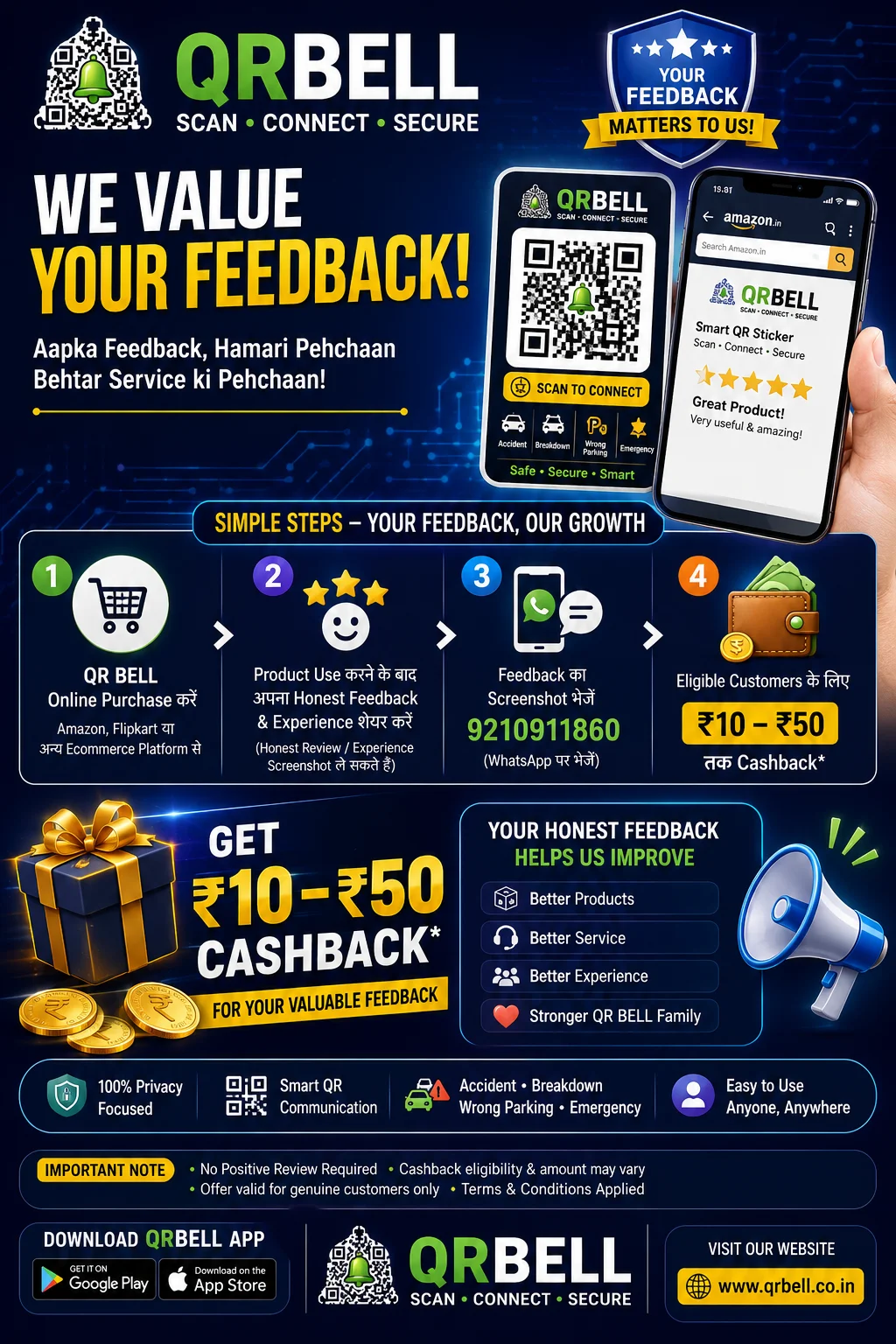
QR BELL Customer Feedback Program – Share Your Honest Experience & Get Rewarded
QR BELL Customer Feedback Program – Share Your Honest Experience & Get Rewarded At QR BELL, our customers are at the heart of everything we do. Your experience helps us understand what is working well, what can be improved and how we can make our products and services even better. If you have purchased a QR BELL product online, we would love to hear your genuine experience. 🛒 How Does the QR BELL Feedback Program Work? Participating is simple: 1. Purchase QR BELL Online Purchase your QR BELL product through an eligible online marketplace or e-commerce platform such as Amazon, Flipkart or other authorised channels. 2. Use the Product Install/use your QR BELL product and experience its features in your daily life. 3. Share Your Honest Feedback Tell us what you genuinely think about the product, packaging, usability, installation, communication experience or overall customer experience. Your feedback can be positive, negative or suggest improvements. We value genuine feedback—not just positive feedback. 4. Share Your Feedback Screenshot After submitting your feedback through the applicable channel, eligible customers may share the relevant feedback screenshot with our team at: 📱 9210911860 5. Receive the Applicable Reward Eligible participants may receive a ₹10 to ₹50 cashback/reward, subject to the applicable campaign terms, eligibility and verification. ⭐ Why Is Your Feedback Important? Every genuine customer experience gives us valuable insight. Your feedback can help us improve: 📦 Product Quality We can identify areas where our products can be improved. 📱 User Experience Your experience helps us make the QR BELL app and products easier to use. 🛠️ Customer Support Feedback helps us understand where customers need better assistance. 🚀 Future Features Customer suggestions can help us prioritise useful features and improvements. ❤️ Customer Experience Our goal is to create products that are genuinely useful in everyday life. 🔐 Your Honest Opinion Matters QR BELL believes that real customer feedback is more valuable than a forced positive review. You are free to share your genuine experience. Whether you liked the product, faced a problem or have an idea for improvement, we want to hear from you. Your feedback can help us build better products for everyone. 📱 What Is QR BELL? QR BELL – Scan • Connect • Secure is a smart QR-based communication ecosystem designed for applications such as: 🚗 Vehicle Contact 🏠 Home & Door Communication 🏢 Office & Business Contact 🐾 Pet Safety 🔎 Lost & Found 🅿️ Parking Communication 🆘 Emergency Contact 📇 Smart Digital Contact QR BELL is designed to provide a convenient way to connect through QR technology while keeping privacy and ease of communication in focus. 🎁 Cashback & Reward Information The feedback reward is available only for eligible customers participating in the applicable QR BELL feedback campaign. Important: Reward amount may vary between ₹10 and ₹50. Eligibility is subject to campaign terms. Customer/product/order verification may be required. Genuine feedback is encouraged. A positive review is not required to qualify. Cashback/reward is subject to applicable terms and conditions. QR BELL reserves the right to verify submissions and determine campaign eligibility. 📲 Share Your Experience With QR BELL Have you purchased and used QR BELL? We want to hear from you! Share your genuine experience and help us make QR BELL smarter, safer and better. 📱 Feedback WhatsApp/Contact: 9210911860 🌐 Website: www.qrbell.co.in QR BELL SCAN • CONNECT • SECURE Your Feedback. Our Improvement. A Better QR BELL for Everyone.
Read Article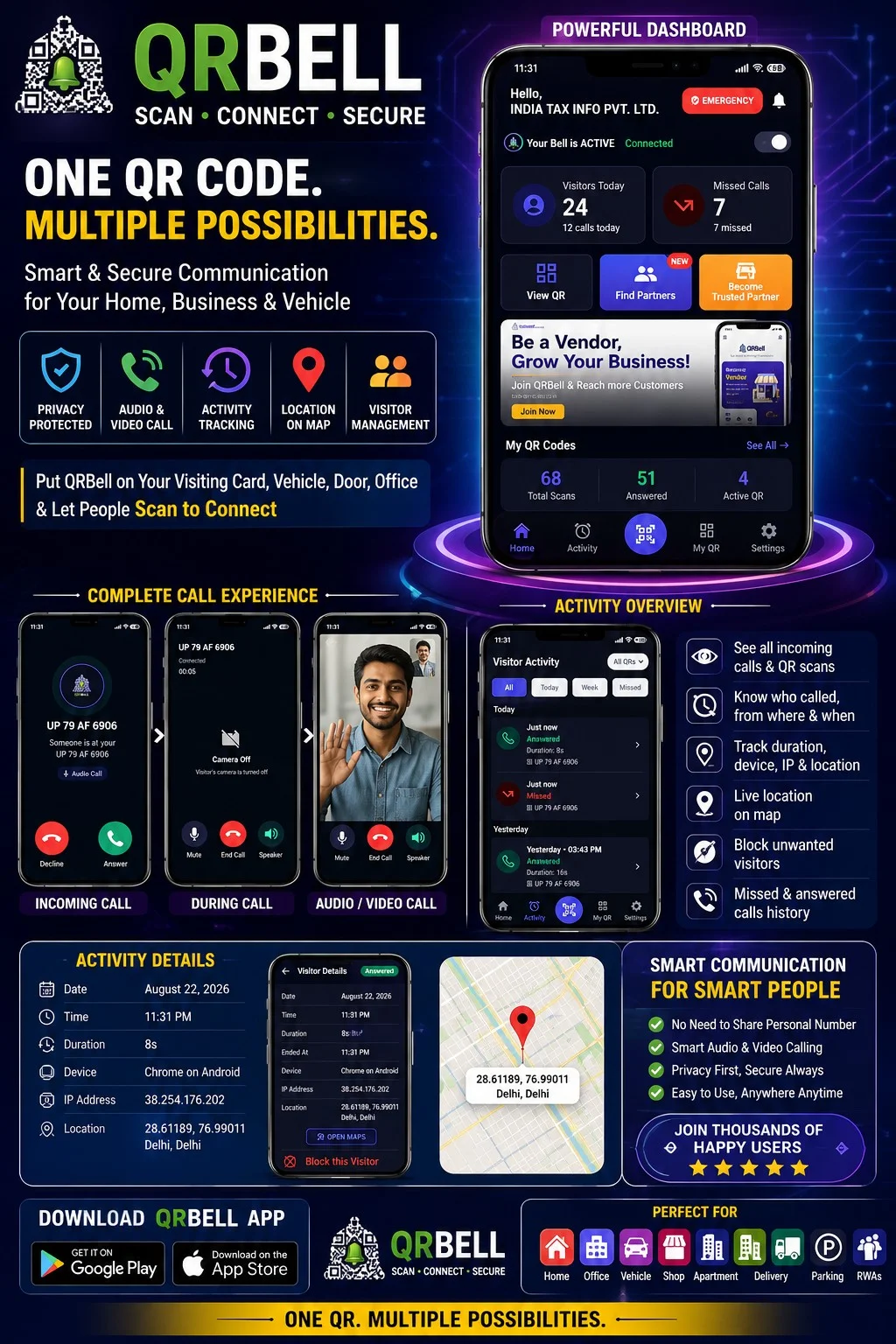
QR BELL App – Smart, Secure & Connected Communication
QR BELL App – Smart, Secure & Connected Communication QR BELL – Scan • Connect • Secure is designed to make everyday communication smarter, more convenient and privacy-focused. Whether you want to connect through your home, office, vehicle, visiting card or QR-enabled device, QR BELL provides a simple way for people to scan and connect without unnecessarily exposing personal contact information. One QR. Multiple Possibilities. QR BELL combines QR-based communication, audio/video calling, visitor activity, QR management, notifications and location-based information in one user-friendly application. The QR BELL app dashboard gives users a central place to manage their QR codes and view communication activity. 📱 Powerful QR BELL Dashboard The QR BELL dashboard provides an easy overview of your connected QR services. Users can view: Active QR status Visitor activity Answered calls Missed calls Total QR scans Multiple QR codes from one account Quick access to QR management Emergency access Partner discovery and partner options This makes it easier to understand what is happening with your QR codes without checking multiple platforms. 📞 Audio & Video Calling QR BELL supports convenient communication through QR-based contact. When someone scans a QR BELL QR Code, the available communication options can allow the user to connect through the supported calling interface. Calling features include: Incoming call notification Normal audio calling Video calling Answer or decline calls Mute option Speaker option Camera on/off during supported video communication Call duration information Missed and answered call history This creates a simple communication experience while keeping the QR-based connection at the center. 📊 Activity & Visitor History One of the important features of QR BELL is its activity dashboard. Users can review communication activity and understand when their QR was used. Activity can be viewed through categories such as: All | Today | Week | Missed Depending on the available activity information, users can see details such as: Date Time Call status Call duration QR used Visitor/device information Location information where available This provides a convenient history of QR-based interactions. 📍 Location & Map Information QR BELL can provide location-related information associated with supported visitor activity. The activity details interface can show available location information along with a map option. Users may be able to review: Visitor location Map position Date and time Device information Interaction details This can be especially useful for understanding where a QR-based interaction originated, subject to the application's permissions, privacy settings and available data. 🔐 Privacy-Focused Communication Privacy is one of the key ideas behind QR BELL. Instead of printing or sharing your personal mobile number everywhere, you can use QR BELL on suitable communication points such as: 📇 Visiting Cards Add QR BELL to your professional visiting card. 📄 Company Letterheads Give clients and visitors a QR-based way to connect. 🌐 Websites Place QR BELL on your professional or business profile. 🚗 Vehicles Use QR BELL for vehicle-related communication. 🏠 Home & Office Use QR BELL for visitor and contact communication. The objective is simple: Stay connected without unnecessarily exposing your personal contact details. 🚗 QR BELL for Vehicles QR BELL can also be used on vehicles to provide a convenient communication channel. A QR BELL QR Code can help people contact the vehicle owner through the supported QR BELL communication system for situations such as: Vehicle contact Wrong parking Emergency communication Vehicle-related assistance Other supported contact situations This can make vehicle communication easier without requiring the vehicle owner to publicly display a personal number. 🏢 QR BELL for Home & Office QR BELL can be useful for homes, offices and commercial spaces where visitors may need to contact the owner, resident or responsible person. Instead of searching for a phone number, a visitor can simply: Scan → Connect → Communicate This makes QR-based visitor communication simple and modern. 📱 Manage Multiple QR Codes Users can manage their QR BELL codes from the app. Depending on the enabled service, users can: View active QR codes Check deactivated QR codes Rename QR codes Activate or deactivate QR codes Download QR codes Share QR codes Manage QR-specific settings Review activity for selected QR codes This is particularly useful for users who have multiple QR codes for different purposes. 🔔 Notification Controls QR BELL provides notification controls to make the app experience more convenient. Users can manage available: Notifications Sound Vibration This allows users to customize how they receive QR BELL activity alerts. 🆘 Emergency Access QR BELL also provides quick access to emergency-related services within the application. Depending on the available location and service integrations, users can search for nearby services such as: Police Petrol pumps Car service Other emergency or support services The goal is to make important assistance easier to access when required. 🤝 QR BELL Partner Network QR BELL is not only a communication platform; it is also building a partner ecosystem. Users can discover QR BELL partners in their nearby or selected areas. Businesses and professionals can also explore the opportunity to: Become a QR BELL Partner The partner ecosystem can help QR BELL expand its reach while giving businesses an opportunity to participate in the growing smart QR communication ecosystem. 🌐 Who Can Use QR BELL? QR BELL can be useful for: Individuals Families Vehicle owners Business owners Directors and CEOs Entrepreneurs Professionals Offices Shops Housing societies Delivery and service businesses Parking operators Commercial establishments 📲 Download the QR BELL App The QR BELL app is designed to provide a centralized experience for managing QR codes, communication and activity. Users can download the application through supported mobile app stores. QR BELL — Scan • Connect • Secure 🌐 www.qrbell.co.in Why Choose QR BELL? 🔐 Privacy Focused Keep personal contact information more controlled. 📱 Smart Communication Connect through QR-based communication. 📞 Audio & Video Calling Use supported audio and video communication features. 📊 Activity Tracking Review QR interaction and call activity. 📍 Location Information View available location information and map details. 🚗 Multiple Use Cases Use QR BELL for vehicles, homes, offices, businesses and professional communication. ⚡ Easy to Use Scan, connect and communicate through one simple QR ecosystem. 🚀 The Future of Smart QR Communication QR technology is moving beyond simple links and payments. QR BELL aims to transform the QR Code into a smart communication and connectivity tool. From professional visiting cards to vehicles, homes, offices and businesses, QR BELL brings multiple communication possibilities together in one ecosystem. One QR Code. Multiple Possibilities. SCAN • CONNECT • SECURE
Read Article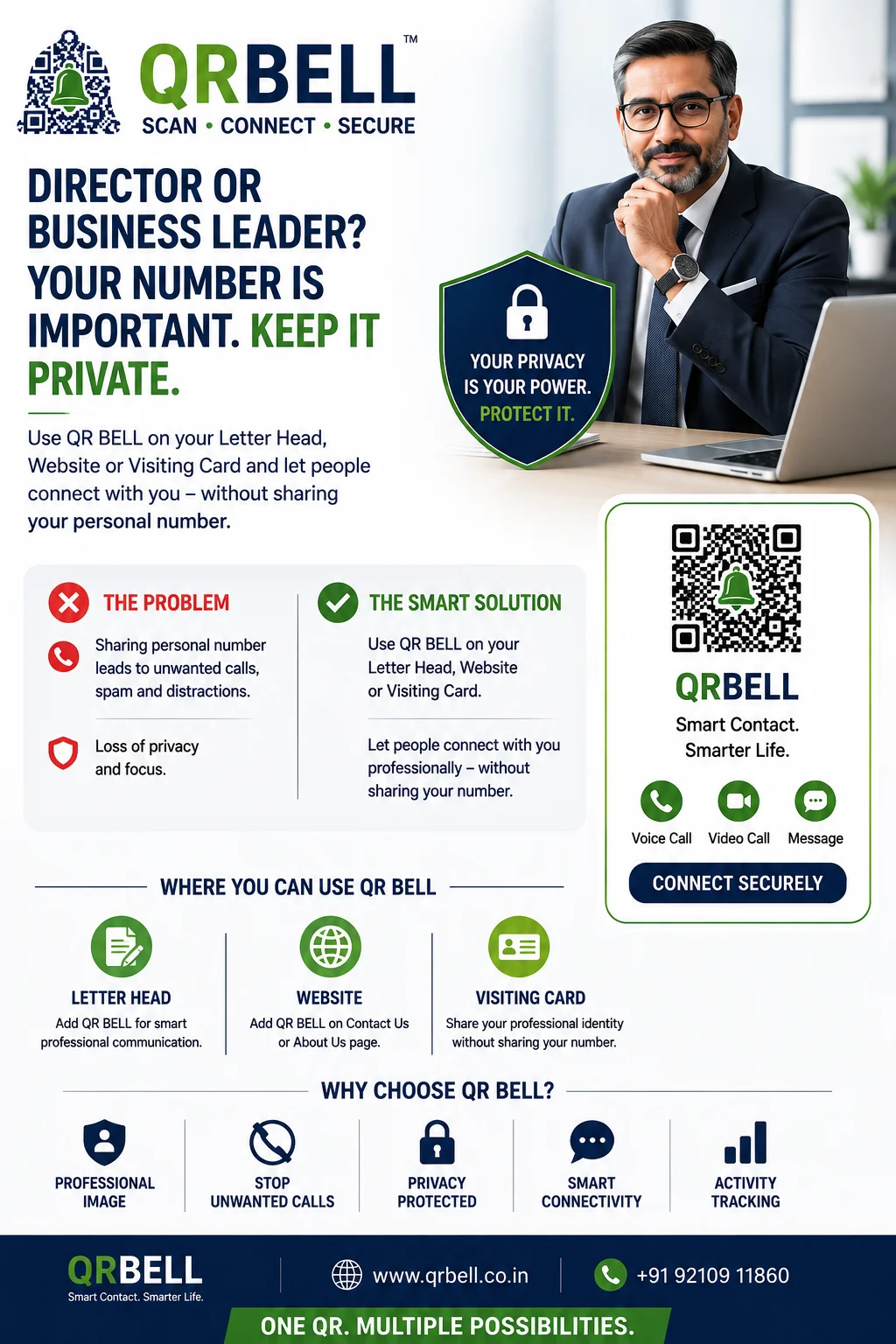
QR BELL for Directors, CEOs & Business Leaders: Keep Your Personal Number Private
QR BELL for Directors, CEOs & Business Leaders: Keep Your Personal Number Private A professional way to stay connected without publicly sharing your personal mobile number In today's business environment, Directors, CEOs, founders, senior executives, consultants and other professionals often need to remain accessible to customers, employees, vendors, visitors and business partners. However, sharing a personal mobile number on every visiting card, letterhead, website, brochure or business document can also lead to unwanted calls, spam and unnecessary interruptions. QR BELL offers a smarter alternative: place a QR BELL QR Code on your visiting card, company letterhead or website and allow people to connect with you through a QR-based communication channel instead of publicly displaying your personal number. QR BELL describes its core service as a smart QR-based communication system designed to connect people without sharing personal mobile numbers. Why Should Business Leaders Protect Their Personal Number? For a senior professional, a mobile number can quickly become widely circulated. Once printed on: Business cards Company letterheads Websites Company profiles Brochures Presentations Public directories Marketing materials the number may be copied, forwarded or saved by people outside the intended professional network. This can result in: Unwanted calls Marketing calls Spam messages Unnecessary interruptions Repeated calls outside business hours Loss of personal privacy For a Director or senior executive, protecting personal communication is therefore not just about convenience—it is also about maintaining professional boundaries and privacy. The QR BELL Solution Instead of printing your personal mobile number everywhere, you can display a QR BELL QR Code. For example: On Your Visiting Card Scan QR BELL to Connect On Your Company Letterhead
Read Article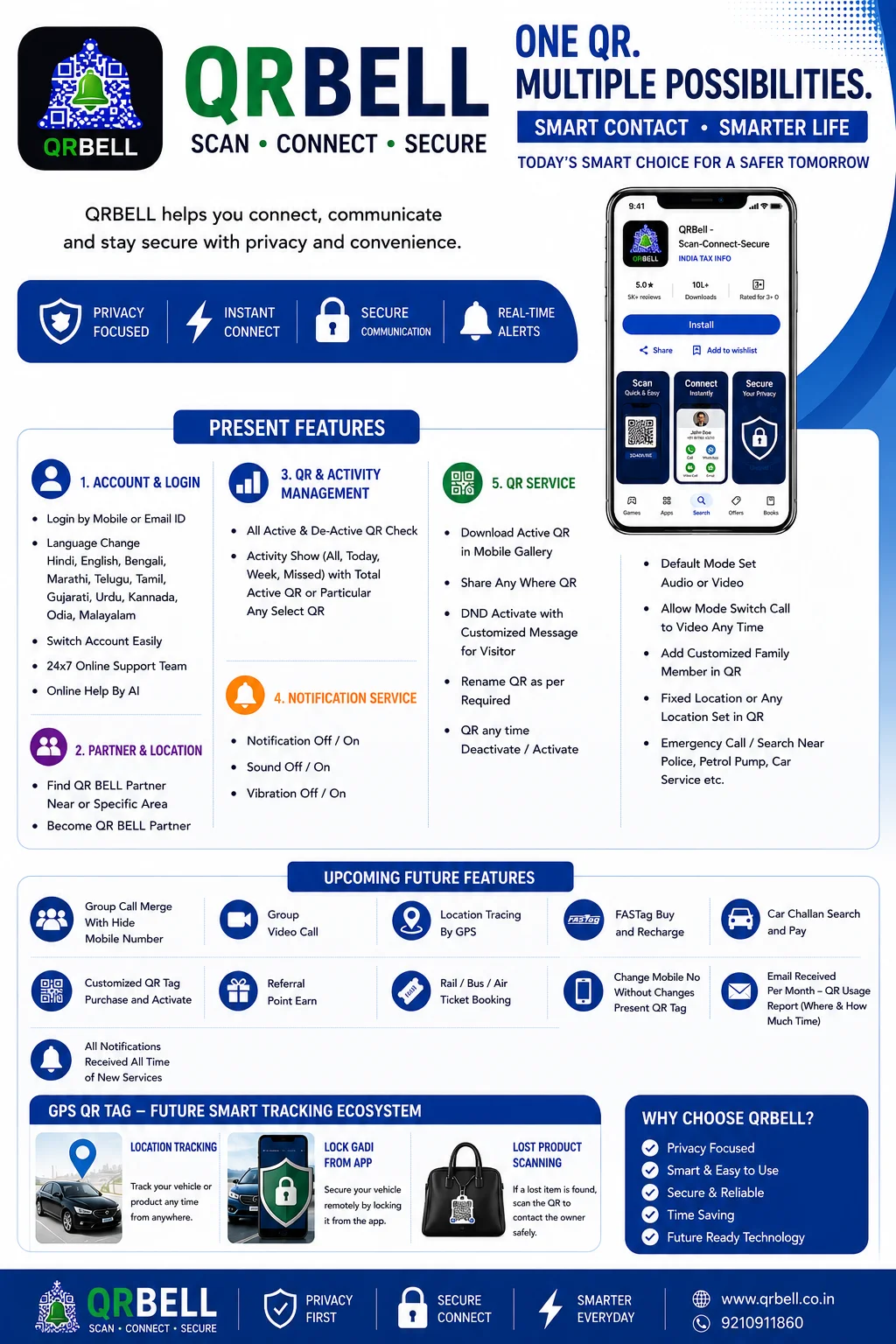
QR BELL: One QR, Multiple Possibilities | Smart Connectivity का भविष्य
QR BELL: One QR, Multiple Possibilities | Smart Connectivity का भविष्य आज की digital दुनिया में communication केवल phone call या message तक सीमित नहीं रह गया है। लोगों को ऐसी technology की जरूरत है जो smart, convenient, privacy-focused और connected हो। इसी vision के साथ QR BELL एक smart QR-based connectivity ecosystem के रूप में विकसित हो रहा है। इसका उद्देश्य QR technology को केवल scanning तक सीमित न रखते हुए Smart Contact, Privacy, Emergency Assistance, QR Management, Partner Network, Location Services और Future GPS Solutions के साथ जोड़ना है। 🔔 QR BELL क्या है? QR BELL – Scan • Connect • Secure एक smart QR ecosystem है, जिसमें users अपने QR Tags को manage कर सकते हैं, activity देख सकते हैं, communication preferences सेट कर सकते हैं और जरूरत के अनुसार विभिन्न smart services का उपयोग कर सकते हैं। QR BELL का मूल उद्देश्य है: एक QR को कई practical जरूरतों से जोड़ना। 🟢 QR BELL की वर्तमान Live Features 1. 🔐 Secure Login & Multi-Language Support QR BELL users Mobile Number या Email ID के माध्यम से अपने account में login कर सकते हैं। भारत की linguistic diversity को ध्यान में रखते हुए platform में कई भारतीय भाषाओं का support उपलब्ध है: Hindi | English | Bengali | Marathi | Telugu | Tamil | Gujarati | Urdu | Kannada | Odia | Malayalam इससे अलग-अलग राज्यों और भाषाओं के users के लिए QR BELL को समझना और इस्तेमाल करना आसान होता है। 2. 🤝 QR BELL Partner Network QR BELL users अपने आसपास या किसी specific location में QR BELL Partner खोज सकते हैं। साथ ही businesses और eligible individuals के लिए: Become a QR BELL Partner का opportunity available है। Partner ecosystem का उद्देश्य local businesses को QR BELL के smart connectivity ecosystem से जोड़ना और customers तक QR-based solutions की पहुंच बढ़ाना है। 3. 📊 Smart Dashboard & Activity Tracker QR BELL users अपने सभी QR Tags को एक centralized dashboard से manage कर सकते हैं। Dashboard में: Active QR Deactivated QR Total Active QR Total Activity Today's Activity Weekly Activity Missed Activity Individual QR Activity जैसी information देखी जा सकती है। किसी particular QR को select करके उसकी activity को अलग से भी monitor किया जा सकता है। यह feature users को अपने अलग-अलग QR Tags को एक ही जगह से manage करने में सुविधा देता है। 4. 🔔 Notification & Alert Controls QR BELL users को notifications पर control देने के लिए customizable settings उपलब्ध हैं। अपनी आवश्यकता के अनुसार: Notification ON/OFF Sound ON/OFF Vibration ON/OFF कर सकते हैं। इससे users अपने QR activity alerts को अपनी preference के अनुसार configure कर सकते हैं। 5. 🤖 24×7 Support & AI Assistance QR BELL ecosystem में users की सहायता के लिए online support और AI-based assistance को महत्व दिया गया है। Users को: Online Help AI Assistance Service Guidance Feature Support Account-related Assistance जैसी सुविधाओं तक access देने का उद्देश्य है। 6. 📱 Advanced QR Services QR BELL अपने QR Tags को manage करने के लिए कई सुविधाएँ प्रदान करता है। QR Download & Share Active QR को mobile gallery में download किया जा सकता है और जरूरत के अनुसार WhatsApp, social media या अन्य digital platforms पर share किया जा सकता है। QR Rename हर QR को उसकी purpose के अनुसार customized name दिया जा सकता है। उदाहरण: My Car | Home | Office | Pet | Bike | Emergency | Shop Activate / Deactivate QR को आवश्यकता के अनुसार activate या deactivate किया जा सकता है। 7. 🚫 DND Mode with Customized Message यदि user किसी समय contact receive नहीं करना चाहता, तो Do Not Disturb (DND) mode का उपयोग किया जा सकता है। इसके साथ visitor के लिए customized message भी set किया जा सकता है। उदाहरण: “Currently unavailable. Please try again later.” इससे QR contact experience को user की availability के अनुसार customize किया जा सकता है। 8. 🎥 Audio & Video Communication QR BELL communication preferences में Audio और Video options को support करने की दिशा में काम कर रहा है। User default communication mode को configure कर सकता है और supported communication flow में आवश्यकता पड़ने पर Audio से Video पर switch करने का option मिल सकता है। 9. 👨👩👧 Family Member Management QR BELL में users अपनी जरूरत के अनुसार family members को QR communication या alert ecosystem में जोड़ सकते हैं। इसका उपयोग family, home, vehicle या अन्य important QR use cases में किया जा सकता है। 10. 📍 Location Management QR BELL users अपने QR के लिए: Fixed Location Updated Location Applicable Location Information set/manage कर सकते हैं। यह feature home, shop, vehicle या location-based QR applications में उपयोगी हो सकता है। 11. 🚨 Emergency & Nearby Services Emergency या आवश्यकता की स्थिति में QR BELL ecosystem users को आसपास की essential services खोजने में मदद कर सकता है। जैसे: 🚔 Police ⛽ Petrol Pump 🔧 Car Service 🏥 Emergency Services 📍 अन्य Nearby Services उद्देश्य है कि जरूरत के समय relevant service तक पहुंच आसान हो। 🔵 QR BELL – Upcoming Future Features QR BELL का vision वर्तमान QR services से आगे बढ़कर एक व्यापक Smart Connectivity & Digital Services Ecosystem बनाना है। आने वाले समय में कई advanced features develop किए जा रहे हैं। 12. 🔒 Privacy-First Group Calling भविष्य में QR BELL में privacy-focused group communication को और मजबूत करने की दिशा में काम किया जा रहा है। संभावित सुविधाएँ: Hide Mobile Number के साथ Group Calling Multiple Participants Privacy-focused communication Group Video Calling इसका उद्देश्य users को personal contact details unnecessary रूप से expose किए बिना group communication का बेहतर विकल्प देना है। 13. 🛰️ GPS-Based Live Location Tracking भविष्य के QR BELL ecosystem में GPS technology का उपयोग करके supported devices और assets की location tracking की सुविधा विकसित की जा सकती है। संभावित applications: Vehicle Tracking Asset Tracking Location Monitoring Real-Time Location Access 14. 🚗 FASTag & Smart Mobility Services QR BELL future roadmap में mobility-related services को एक platform पर लाने की दिशा में भी काम कर रहा है। संभावित services: FASTag FASTag Purchase FASTag Recharge Vehicle Services E-Challan Search Challan Payment Travel Services Railway Ticket Booking Bus Ticket Booking Air Ticket Booking इन services की availability संबंधित third-party integrations, service providers और applicable regulations पर निर्भर करेगी। 15. 🏷️ Customized QR Tag Purchase भविष्य में users अपनी जरूरत के अनुसार customized QR Tags purchase और activate कर सकेंगे। संभावित options: Customized Design Customized Name Specific Use Case QR Tag Purchase Online Activation इससे users अपने individual requirements के अनुसार QR ecosystem को personalize कर सकेंगे। 16. 🎁 Referral Points & Rewards QR BELL future में referral-based reward ecosystem को भी विकसित करने की दिशा में काम कर रहा है। Users और Partners eligible referrals के माध्यम से: Referral Points Rewards Partner Benefits Promotional Incentives प्राप्त कर सकते हैं, subject to applicable program terms. 17. 📱 Mobile Number बदलें, QR Tag रखें भविष्य की महत्वपूर्ण सुविधाओं में से एक है: Change Mobile Number Without Changing Your QR Tag यदि user का registered mobile number बदल जाता है, तो भविष्य में existing QR Tag को बनाए रखते हुए account information update करने की सुविधा उपलब्ध कराने का लक्ष्य है। इसका फायदा यह होगा कि केवल mobile number बदलने के कारण QR Tag को replace करने की आवश्यकता कम हो सकती है। यह सुविधा account verification और system eligibility के अधीन होगी। 18. 📧 Monthly QR Usage Report QR BELL future analytics system users को monthly QR usage report प्रदान करने की दिशा में काम कर रहा है। इस report में संभावित जानकारी शामिल हो सकती है: QR कितनी बार scan हुआ QR कब इस्तेमाल हुआ कौन सा QR इस्तेमाल हुआ Activity duration Applicable location information Individual QR usage Monthly activity summary इससे users अपने QR Tags के usage pattern को बेहतर तरीके से समझ सकेंगे। 19. 🔔 New Service Notifications QR BELL ecosystem में नई services और features जुड़ने पर users को notifications प्राप्त करने की सुविधा भी future roadmap का हिस्सा है। Users को मिल सकती हैं: New Service Alerts New Feature Updates Important Announcements Security Notifications Product Updates Partner Services Updates 🟣 Premium Add-On: GPS QR BELL TAG QR BELL का future ecosystem केवल QR scanning तक सीमित नहीं रहेगा। GPS QR BELL TAG को QR identification और GPS-enabled tracking capabilities के combination के रूप में विकसित करने की दिशा में काम किया जा रहा है। 20. 🌍 Global Live Tracking Supported GPS-enabled devices/assets के लिए future GPS QR BELL TAG के माध्यम से: 📍 Real-Time Location 🌍 Remote Location Access 📱 Mobile-based Monitoring 🚗 Vehicle Location Tracking 📦 Asset Tracking जैसी capabilities विकसित की जा सकती हैं। 21. 🔐 Smart Vehicle Security Future GPS QR BELL solutions में compatible vehicles के लिए advanced security controls भी शामिल किए जा सकते हैं। संभावित functionality: Remote Vehicle Security Management और technical तथा legal requirements के अनुसार compatible systems में remote locking/immobilization जैसी सुविधाओं पर भी काम किया जा सकता है। 22. 🔎 Lost & Found Recovery QR BELL का Lost & Found concept किसी खोई हुई वस्तु को उसके owner से reconnect करने में मदद करने के लिए designed है। Basic concept: Lost Item → QR Scan → Secure Contact → Owner Communication → Recovery यदि item पर QR BELL Tag लगा है, तो finder QR scan करके उपलब्ध contact mechanism के माध्यम से owner तक communication करने का प्रयास कर सकता है। GPS-enabled version में supported tracking capability recovery process को और बेहतर बना सकती है। 🌟 QR BELL किन लोगों के लिए उपयोगी हो सकता है? QR BELL ecosystem अलग-अलग users के लिए विकसित किया जा रहा है: 🚗 Vehicle Owners 🏠 Families & Homeowners 🐕 Pet Owners 🎒 Students ✈️ Travellers 🏢 Businesses 🏪 Retailers 🤝 Partners 🚚 Fleet Operators 📦 Asset Owners 🔐 QR BELL का Core Focus QR BELL के पूरे ecosystem के पीछे तीन मुख्य concepts हैं: PRIVACY अनावश्यक personal information sharing को कम करने पर focus. CONNECTIVITY जरूरत के समय people, vehicles, assets और services को connect करना। CONVENIENCE एक ही smart ecosystem से multiple services को manage करने की दिशा में प्रयास। 🇮🇳 QR BELL का Vision QR BELL का लक्ष्य सिर्फ एक QR Tag बनाना नहीं है। हमारा vision है: “एक ऐसा Smart Connectivity Ecosystem बनाना जो लोगों की everyday life को अधिक connected, convenient और privacy-focused बनाए।” आज QR Tag से शुरुआत होकर भविष्य में: Smart Communication → Emergency Services → Partner Network → GPS Tracking → Vehicle Solutions → Travel Services → AI Assistance तक एक व्यापक ecosystem विकसित करने की दिशा में QR BELL आगे बढ़ रहा है। 🚀 ONE QR. MULTIPLE POSSIBILITIES. एक QR Code कई तरह के practical use cases से जुड़ सकता है। एक app कई services को manage कर सकता है। और एक connected ecosystem लोगों को smart तरीके से जोड़ सकता है। 🔔 QR BELL Scan • Connect • Secure 🌐 www.qrbell.co.in 📞 9210911860 QR BELL – Building the Future of Smart Connectivity. ❓ Frequently Asked Questions Q1. QR BELL क्या है? QR BELL एक smart QR-based connectivity ecosystem है, जो QR management, communication, privacy-focused contact, emergency services और future smart tracking solutions को एक platform से जोड़ने की दिशा में काम करता है। Q2. QR BELL में कौन-कौन सी languages उपलब्ध हैं? QR BELL में Hindi, English, Bengali, Marathi, Telugu, Tamil, Gujarati, Urdu, Kannada, Odia और Malayalam जैसी भाषाओं का support उपलब्ध है। Q3. क्या एक account में multiple QR Tags manage किए जा सकते हैं? हाँ, QR BELL का centralized dashboard users को multiple QR Tags manage करने की सुविधा देता है। Q4. क्या QR activity देखी जा सकती है? हाँ, उपलब्ध activity dashboard में All, Today, Week और Missed Activity जैसी जानकारी देखी जा सकती है। Q5. क्या QR को deactivate किया जा सकता है? हाँ, QR को आवश्यकता के अनुसार Activate या Deactivate करने की सुविधा उपलब्ध है। Q6. क्या QR का नाम बदला जा सकता है? हाँ, user अपनी आवश्यकता के अनुसार QR का customized name set कर सकता है। Q7. क्या QR को mobile में download किया जा सकता है? Active QR को mobile gallery में download करने और digital platforms पर share करने की सुविधा उपलब्ध है। Q8. QR BELL Partner कौन बन सकता है? Eligible individuals और businesses QR BELL Partner Network से जुड़ने के लिए Partner Program explore कर सकते हैं। Q9. GPS QR BELL TAG क्या है? GPS QR BELL TAG एक future-focused concept है जो QR identification को GPS-enabled tracking capabilities के साथ जोड़ने की दिशा में विकसित किया जा रहा है। Q10. क्या future features अभी available हैं? सभी future features अभी live होना जरूरी नहीं है। उनकी availability development, testing, technical feasibility, third-party integration और applicable laws/regulations पर निर्भर करेगी।
Read Article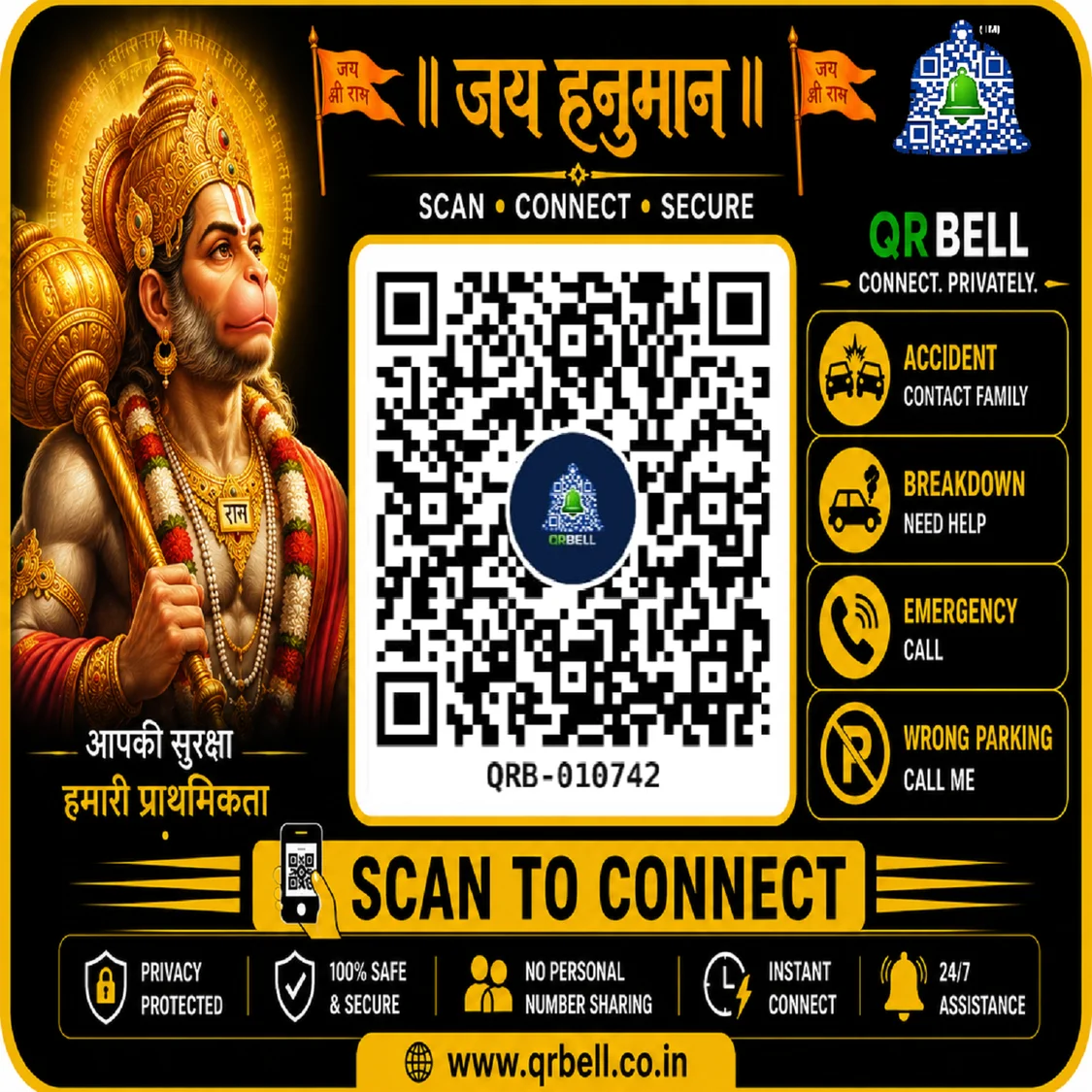
जय हनुमान | QR BELL – आपकी सुरक्षा, हमारी प्राथमिकता
Scan • Connect • Secure मंगलवार का दिन भगवान हनुमान जी की भक्ति, शक्ति, साहस और सुरक्षा के लिए विशेष माना जाता है। इसी भावना के साथ QR BELL का उद्देश्य आधुनिक तकनीक के माध्यम से लोगों को एक ऐसा स्मार्ट संपर्क समाधान उपलब्ध कराना है, जो जरूरत के समय संपर्क को आसान और privacy को प्राथमिकता दे। आज सड़क पर चलते समय Accident, Car Breakdown, Wrong Parking या Emergency जैसी परिस्थितियाँ कभी भी सामने आ सकती हैं। ऐसी स्थिति में वाहन मालिक या संबंधित व्यक्ति तक जल्दी संपर्क करना जरूरी होता है। QR BELL इसी जरूरत के लिए QR-based smart contact solution प्रस्तुत करता है। 🔔 QR BELL क्या है? QR BELL एक smart QR-based communication solution है, जिसके माध्यम से किसी QR Code को scan करके उपलब्ध contact सुविधा का उपयोग किया जा सकता है। QR BELL का मूल विचार सरल है: एक QR Scan → Smart Contact → Better Connectivity जहाँ सामान्यतः किसी व्यक्ति का mobile number साझा करना पड़ सकता है, वहाँ QR BELL का उद्देश्य privacy-focused contact experience उपलब्ध कराना है। QR BELL – Scan • Connect • Secure 🚗 Accident की स्थिति में QR BELL सड़क पर Accident एक ऐसी स्थिति है जिसमें समय बहुत महत्वपूर्ण होता है। यदि किसी वाहन पर QR BELL लगा है, तो आवश्यकता पड़ने पर सामने वाला व्यक्ति QR Code scan करके उपलब्ध contact mechanism के माध्यम से vehicle owner/family contact तक communication करने का प्रयास कर सकता है। Accident में संभावित उपयोग: 🚨 Vehicle owner से संपर्क 👨👩👧 Family contact तक communication 📱 Smart QR-based contact 🔐 Privacy-focused communication ⚡ जरूरत के समय quick connectivity एक छोटा QR Code, emergency situation में संपर्क का एक अतिरिक्त माध्यम बन सकता है। 🔧 Car Breakdown में QR BELL Car या Bike का Breakdown कहीं भी हो सकता है—घर से दूर, highway पर, market में या parking area में। Vehicle पर QR BELL Tag होने से जरूरत पड़ने पर कोई व्यक्ति QR Code scan करके owner से संपर्क करने की कोशिश कर सकता है। उदाहरण: अगर आपकी Car सड़क पर खराब हो गई और आपको किसी सहायता की जरूरत है, तो QR BELL एक smart contact identity के रूप में काम आ सकता है। 🚫 Wrong Parking के लिए Smart Contact Wrong Parking या किसी vehicle के रास्ता रोकने की स्थिति में सबसे बड़ी समस्या होती है: “Vehicle owner से संपर्क कैसे करें?” QR BELL इसी समस्या को smart तरीके से address करने का प्रयास करता है। Vehicle पर QR BELL Tag देखकर व्यक्ति QR Code scan कर सकता है और available contact facility के माध्यम से owner तक communication कर सकता है। इसका फायदा: No unnecessary number sharing + Smart QR Contact 🆘 Emergency Contact Emergency कभी बताकर नहीं आती। ऐसी स्थिति में यदि किसी vehicle या relevant item पर QR BELL उपलब्ध है, तो QR scan के माध्यम से available contact options तक पहुँचा जा सकता है। यह विशेष रूप से उन परिस्थितियों में उपयोगी हो सकता है जहाँ किसी व्यक्ति को owner या संबंधित contact तक पहुँचने की आवश्यकता हो। 🔐 Privacy First – QR BELL की खासियत आज के digital युग में Privacy बहुत महत्वपूर्ण है। हर जगह अपना personal mobile number देना या सार्वजनिक रूप से share करना हर व्यक्ति के लिए comfortable नहीं होता। QR BELL का उद्देश्य है: 🔒 Privacy Protected 🛡️ Safe & Secure Connection 👤 No Personal Number Sharing ⚡ Instant Connect 🔔 24/7 Assistance इस तरह QR BELL convenience के साथ privacy-focused connectivity को बढ़ावा देता है। 📱 QR BELL कैसे काम करता है? QR BELL का basic process आसान है: 1️⃣ QR BELL Tag लगाएँ अपने Vehicle या अन्य suitable item पर QR BELL Tag लगाएँ। 2️⃣ QR Code Scan करें जिस व्यक्ति को संपर्क करना है, वह smartphone से QR Code scan कर सकता है। 3️⃣ Contact सुविधा का उपयोग करें Scan के बाद उपलब्ध QR BELL contact mechanism के माध्यम से communication किया जा सकता है। 4️⃣ Smartly Connect करें जरूरत के अनुसार owner/contact तक communication किया जा सकता है। 🚘 QR BELL केवल Car के लिए नहीं QR BELL ecosystem को कई use cases के लिए उपयोग किया जा सकता है। प्रमुख उपयोग: 🚗 Vehicle Contact 🐾 Pet Safety 🎒 Bag & Luggage 🏠 Digital Door Bell 🔎 Lost & Found 🆘 Emergency Contact 🅿️ Smart Parking यानी: ONE QR • MANY USES • MANY BENEFITS 🐾 Pet Safety में QR BELL QR BELL का उपयोग Pet Safety और Lost & Found के लिए भी किया जा सकता है। Pet के collar/tag पर QR Code उपलब्ध होने पर, यदि pet कहीं खो जाता है और कोई व्यक्ति उसे पाता है, तो वह QR Code scan करके available contact mechanism के माध्यम से owner तक पहुँचने का प्रयास कर सकता है। आपके Pet की Smart Identity – QR BELL के साथ। 🎒 Bag और Luggage के लिए QR BELL Travel करते समय luggage या bag खो जाना एक आम परेशानी हो सकती है। QR BELL QR Tag को: Travel Bag School Bag Office Bag Backpack Suitcase Luggage जैसी वस्तुओं पर उपयोग किया जा सकता है। इससे Lost & Found situation में finder के लिए owner तक communication का रास्ता उपलब्ध कराया जा सकता है। 🏠 Digital Door Bell QR BELL का एक महत्वपूर्ण use case Digital Door Bell भी है। Traditional doorbell के अतिरिक्त QR-based smart contact solution के माध्यम से visitor को smart तरीके से connect करने का विकल्प दिया जा सकता है। इसका उद्देश्य है: Smart Welcome + Better Privacy + Convenient Communication 🅿️ Smart Parking Parking में भी QR-based communication उपयोगी हो सकता है। यदि किसी vehicle को move करने की जरूरत हो या parking से संबंधित communication करना हो, तो QR BELL एक additional smart contact channel प्रदान कर सकता है। 🇮🇳 भारत में Smart & Connected Future भारत तेजी से digital technology को अपना रहा है। QR technology आज payments से लेकर identification और communication तक अनेक क्षेत्रों में उपयोग की जा रही है। QR BELL इसी technology को Vehicle Safety, Privacy, Emergency Communication, Lost & Found और Smart Living जैसे practical use cases से जोड़ने का प्रयास है। हमारा संदेश: छोटा सा QR Scan, बड़ा बदलाव — सुरक्षित संपर्क की नई पहचान। 🚩 मंगलवार विशेष – जय हनुमान भगवान हनुमान जी शक्ति, साहस, सेवा और सुरक्षा के प्रतीक माने जाते हैं। इस मंगलवार पर हमारा संदेश है: “आपकी सुरक्षा हमारी प्राथमिकता।” जहाँ technology लोगों को जोड़ती है, वहाँ technology का उपयोग सुरक्षित और जिम्मेदार तरीके से होना भी जरूरी है। QR BELL इसी सोच के साथ: Scan • Connect • Secure की दिशा में आगे बढ़ रहा है। 🤝 QR BELL Partner Program QR BELL केवल customers के लिए ही नहीं, बल्कि businesses के लिए भी business opportunity प्रस्तुत करता है। निम्न businesses QR BELL products को अपने customers तक पहुँचा सकते हैं: 🏪 General Store 📱 Mobile Shop 🚗 Automobile Shop 🐾 Pet Shop 💊 Chemist / Medical Store ⛽ Petrol Pump 🎁 Gift Shop 🏢 Local Retailer 🚆 Railway Vendor 🛍️ अन्य Retail Businesses Partner बनने के फायदे ✔️ Additional Business Opportunity ✔️ New Product Category ✔️ Existing Customers को Smart Solution ✔️ Growing Smart Safety Ecosystem का हिस्सा बनने का अवसर ✔️ QR BELL Brand के साथ Business Growth Opportunity 🔔 QR BELL – आपकी सुरक्षा, आपका संपर्क, आपकी Privacy आज जरूरत केवल connectivity की नहीं है, बल्कि smart और privacy-focused connectivity की है। चाहे बात हो: Accident की, Breakdown की, Wrong Parking की, Emergency की, Pet Safety की या Lost & Found की— QR BELL का उद्देश्य है जरूरत के समय contact को आसान बनाना। QR BELL Scan • Connect • Secure 🌐 www.qrbell.co.in 📧 support@qrbell.co.in ❓ Frequently Asked Questions (FAQ) Q1. QR BELL क्या है? QR BELL एक QR-based smart contact और connectivity solution है, जिसका उपयोग विभिन्न situations में communication को आसान बनाने के लिए किया जा सकता है। Q2. QR BELL Vehicle पर क्यों लगाएँ? Accident, Breakdown, Wrong Parking और अन्य vehicle-contact situations में owner से संपर्क करने का अतिरिक्त माध्यम उपलब्ध कराने के लिए। Q3. QR BELL को कैसे scan किया जाता है? सामान्य smartphone camera या QR scanner से QR Code scan किया जा सकता है। Q4. क्या QR BELL personal mobile number share करता है? QR BELL का उद्देश्य privacy-focused communication प्रदान करना और unnecessary personal number sharing से बचना है। Q5. क्या QR BELL Pet के लिए इस्तेमाल किया जा सकता है? हाँ, QR BELL QR Tag का उपयोग Pet Safety और Lost & Found situations में किया जा सकता है। Q6. क्या QR BELL Bag और Luggage के लिए उपयोगी है? हाँ। Bag, Luggage और अन्य important items पर QR Tag का उपयोग Lost & Found communication के लिए किया जा सकता है। Q7. QR BELL Partner कौन बन सकता है? Retail shops, automobile shops, pet shops, mobile shops, general stores, chemists और अन्य interested businesses Partner Program explore कर सकते हैं।
Read Article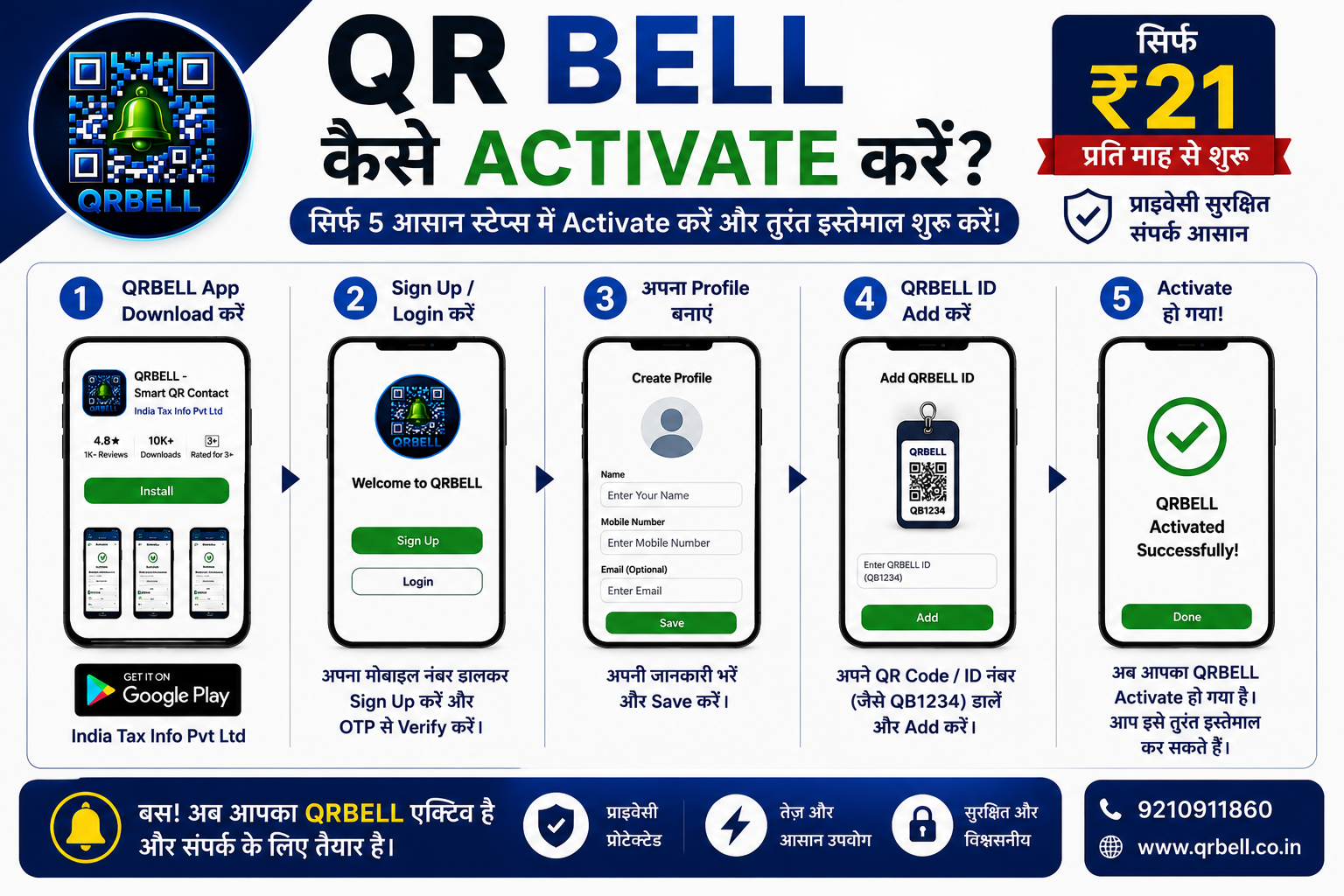
QRBELL को कैसे Activate करें? – सिर्फ 5 आसान स्टेप्स में शुरू करें
# QRBELL को कैसे Activate करें? – सिर्फ 5 आसान स्टेप्स में शुरू करें अगर आपने QRBELL खरीद लिया है, तो अब अगला कदम है इसे सही तरीके से Activate करना। अच्छी बात यह है कि पूरा प्रोसेस केवल कुछ मिनटों में पूरा हो जाता है। ## Step 1: QRBELL App डाउनलोड करें सबसे पहले Google Play Store खोलें और **QRBELL** सर्च करें। Publisher: **India Tax Info Pvt Ltd** या सीधे App डाउनलोड करें। ## Step 2: Sign Up / Login करें मोबाइल नंबर दर्ज करें। OTP से Verify करें। अगर पहले से अकाउंट है तो सीधे Login करें। ## Step 3: अपनी Profile बनाएं अपना नाम, मोबाइल नंबर और आवश्यक जानकारी भरें। यही जानकारी ज़रूरत पड़ने पर संपर्क स्थापित करने में उपयोग की जाएगी। ## Step 4: अपना QRBELL ID Add करें अपने QR Sticker या Product पर दिया गया **QRBELL ID** (जैसे QB1234) दर्ज करें। इसके बाद इसे अपने अकाउंट से लिंक कर दें। ## Step 5: Activate करें सारी जानकारी Save करते ही आपका QRBELL सफलतापूर्वक Activate हो जाएगा। अब आपका QRBELL इस्तेमाल के लिए तैयार है। ## QRBELL Activate करने के फायदे * QR Code आपके अकाउंट से लिंक हो जाता है। * अपनी जानकारी कभी भी अपडेट कर सकते हैं। * Privacy बनाए रखते हुए संपर्क की सुविधा मिलती है। * App से पूरा कंट्रोल आपके हाथ में रहता है। * केवल कुछ मिनटों में पूरा Setup हो जाता है। ## QRBELL App कहाँ से डाउनलोड करें? 📲 Google Play Store पर **QRBELL** सर्च करें। **Publisher:** India Tax Info Pvt Ltd App Download: https://play.google.com/store/apps/details?id=com.itaxinfo.qrbell&pcampaignid=web_share ## QRBELL Activate करने की वीडियो 🎥 https://youtube.com/shorts/XSoYR-K3Ook?si=QwtK-eBAXWU4xl_- ## QRBELL खरीदें 🛒 Flipkart: https://dl.flipkart.com/dl/product/p/itme?pid=CSKHZEZ9VHAHPV7A&lid=LSTCSKHZEZ9VHAHPV7AXFKOXG ## संपर्क करें 🌐 Website: [www.qrbell.co.in](http://www.qrbell.co.in) 📞 Mobile: 9210911860 📸 Instagram: https://www.instagram.com/qr_bell 📘 Facebook: https://www.facebook.com/profile.php?id=61586378894504 💼 LinkedIn: https://www.linkedin.com/in/qr-bell-b2a9713b0 **QRBELL – छोटा QR, बड़ी सुविधा!**
Read Article