Aug 26, 2026
•
1 min read
•
53 views
QR BELL QR Code Safety Guide: QR Scan के बाद सही Link पर ही Click क्यों करें?
QR BELL QR Code Safety Guide: QR Scan के बाद सही Link पर ही Click क्यों करें?
आज QR Code हमारी रोजमर्रा की जिंदगी का हिस्सा बन चुका है। Shopping, payment, websites, product information, digital contact, parking और कई दूसरी सेवाओं के लिए लोग QR Code का इस्तेमाल करते हैं। लेकिन हर QR Code और हर QR-generated link को बिना जांचे खोलना सुरक्षित नहीं माना जा सकता।
इसीलिए QR BELL users के लिए एक महत्वपूर्ण बात समझना जरूरी है:
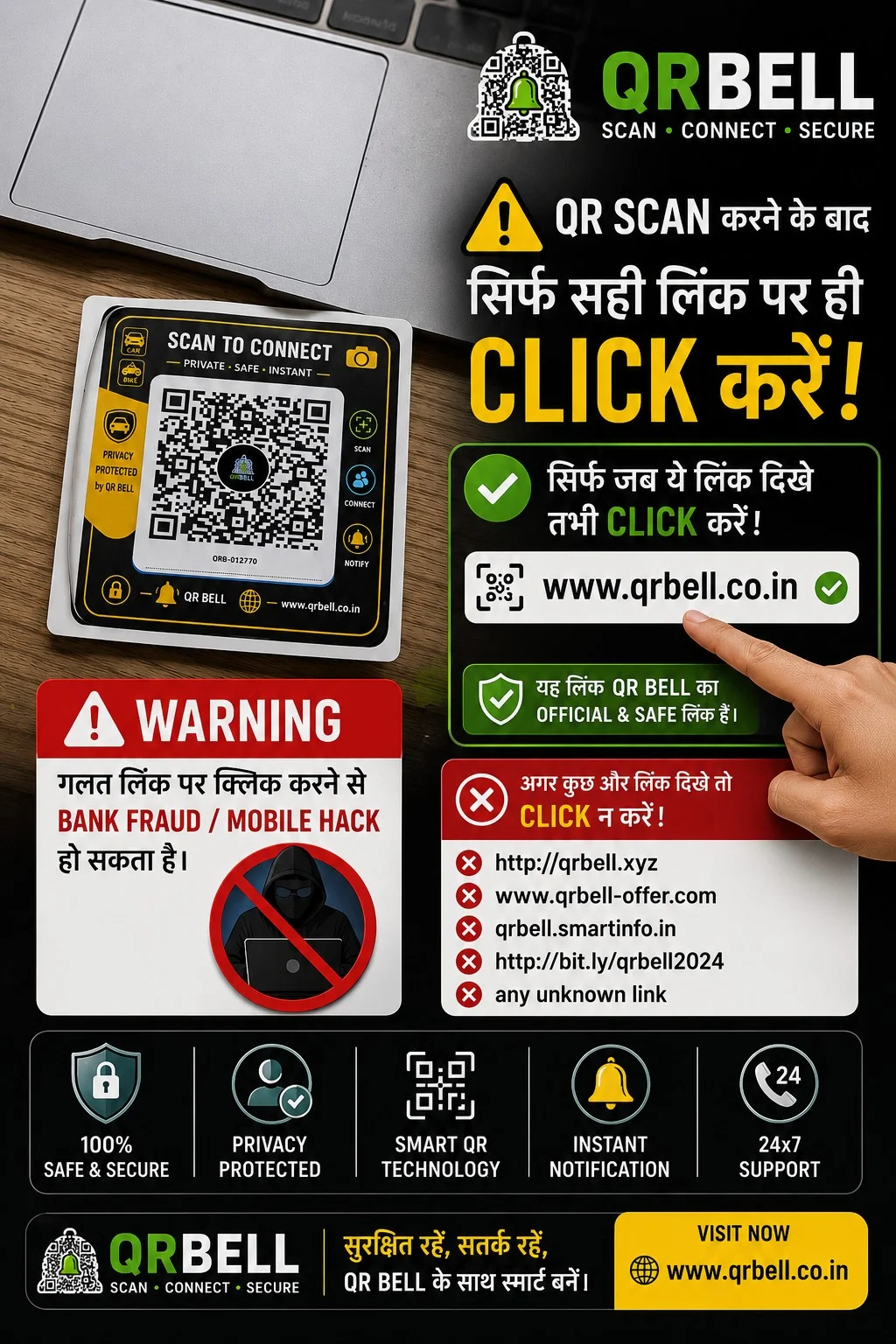
QR Scan करने के बाद किसी भी Link पर तुरंत Click न करें। पहले Link को ध्यान से Verify करें।
QR BELL का उद्देश्य “Scan • Connect • Secure” के साथ smart और privacy-focused communication उपलब्ध कराना है। QR BELL के official platform पर QR-based contact और connectivity solutions उपलब्ध हैं।
SEO Meta Information
Meta Title
QR BELL QR Code Safety: Scan के बाद सही Link कैसे पहचानें? | QR Scam से बचें
Meta Description
QR BELL QR Code scan करने के बाद सही website link कैसे पहचानें? QR scam, phishing, fake links और online fraud से बचने के लिए जरूरी QR Code safety tips जानें।
Focus SEO Keywords
QR BELL, QR Bell QR Code, QR Bell safety, QR Bell security, QR code safety, QR code scam, QR code fraud, QR scan safety, QR link safety, fake QR code, fake QR link, phishing link, QR code phishing, QR code fraud prevention, QR code security tips, safe QR scanning, QR Bell official website, QR Bell India, smart QR technology, secure QR communication, QR code mobile security, QR code bank fraud, QR code online fraud, QR scan करने के बाद क्या करें, QR code पर click करने से पहले क्या देखें
Suggested URL Slug
/qr-bell-qr-code-safety-fake-link-scam-prevention
QR BELL क्या है?
QR BELL – Scan • Connect • Secure एक smart QR-based communication और connectivity platform है।
QR BELL का उपयोग विभिन्न situations में किया जा सकता है, जैसे:
🚗 Vehicle Contact
🏍️ Bike Contact
🏠 Home & Door Communication
🏢 Office & Business Contact
📇 Digital Visiting Card
🅿️ Parking Communication
🐾 Pet & Lost & Found
🆘 Emergency Communication
📦 Product/Asset Contact
QR BELL का उद्देश्य लोगों को QR Code के माध्यम से convenient communication option देना है, ताकि जरूरत पड़ने पर contact किया जा सके और unnecessary personal number sharing को कम किया जा सके।
QR Scan करने के बाद सबसे जरूरी सावधानी
QR Code scan करना अपने आप में कोई समस्या नहीं है। समस्या तब हो सकती है जब scan करने के बाद user बिना जांचे किसी suspicious link, website, payment page या download page पर चला जाए।
Reserve Bank of India भी लोगों को unknown sources से मिले QR Codes scan करने या unknown links पर click करने से सावधान रहने की सलाह देता है।
इसलिए QR scan करने के बाद:
पहले Link देखें → फिर Website पहचानें → फिर आगे बढ़ें।
QR BELL का सही Official Website Link कैसे पहचानें?
QR BELL से संबंधित जानकारी के लिए official website है:
www.qrbell.co.in
QR BELL Official Website
यदि QR BELL के नाम से कोई अलग या suspicious domain दिखाई देता है, तो उसे तुरंत official मानकर click न करें।
Domain spelling ध्यान से देखें।
उदाहरण के लिए:
✅ Official
www.qrbell.co.in
⚠️ Suspicious हो सकता है
qrbell-offer.example
qrbell-login.example
qrbell-free.example
किसी shortened URL का unknown destination
QR BELL जैसा दिखने वाला लेकिन अलग domain
नोट: किसी specific domain को scam कहना तभी उचित है जब उसकी स्वतंत्र पुष्टि हो। इसलिए unknown domain को केवल “suspicious/unverified” मानकर verify करना बेहतर है।
QR Code Scan करने के बाद क्या-क्या Check करें?
1. Website का Domain देखें
सबसे पहले browser में दिखाई देने वाला domain check करें।
क्या spelling सही है?
क्या domain वही है जिसे आप खोलना चाहते थे?
क्या website का नाम suspicious तरीके से बदला हुआ तो नहीं?
2. HTTPS और Browser Warning देखें
Website खोलते समय browser की security warning को ignore न करें।
अगर browser कहता है कि:
“Your connection is not private”
या कोई security warning आती है, तो आगे जाने से पहले रुकें।
3. Unknown Link पर तुरंत Click न करें
यदि QR scan के बाद कई links दिखाई देते हैं, तो हर link पर click करने की जरूरत नहीं है।
पहले देखें:
यह link किस website पर ले जा रहा है?
क्या QR Code से Bank Fraud हो सकता है?
यहां एक महत्वपूर्ण अंतर समझना जरूरी है।
हर QR Code payment QR नहीं होता।
QR Code अलग-अलग information या actions के लिए इस्तेमाल हो सकता है। लेकिन fraudulent QR Codes का इस्तेमाल financial scams में भी किया जा सकता है।
RBI ने specifically चेतावनी दी है कि fraudsters लोगों को QR Code scan करवाकर financial transactions authorize करवाने की कोशिश कर सकते हैं। RBI यह भी बताता है कि पैसा receive करने के लिए QR scan करना या UPI PIN डालना जरूरी नहीं है।
इसलिए:
❌ “पैसा receive करने के लिए यह QR scan करें”
जैसे instructions पर सावधान रहें।
❌ “Refund पाने के लिए UPI PIN डालें”
ऐसा होने पर तुरंत रुकें।
❌ “Cashback पाने के लिए OTP बताएं”
OTP कभी share न करें।
QR Code Scan करने से Mobile Hack हो जाता है?
सिर्फ QR Code scan करना अपने आप mobile hack होने के बराबर नहीं है।
लेकिन QR Code के माध्यम से user को:
malicious website
phishing page
fake login page
suspicious download
fraudulent payment page
पर ले जाने की कोशिश हो सकती है।
इसलिए QR Code scan करने के बाद आप क्या खोलते हैं और क्या information देते हैं, यह बहुत महत्वपूर्ण है।
RBI भी suspicious links पर click न करने और passwords, PIN, OTP तथा CVV जैसी sensitive information share न करने की सलाह देता है।
QR BELL Users के लिए Simple Safety Rule
🟢 SCAN
QR Code scan करें।
🟡 CHECK
Scan के बाद आने वाले website/link को ध्यान से देखें।
🔴 STOP
अगर domain या request suspicious लगे तो आगे न बढ़ें।
🟢 CONNECT
केवल verified और intended service पर ही आगे बढ़ें।
कौन-सी जानकारी कभी Share नहीं करनी चाहिए?
किसी भी unknown व्यक्ति या suspicious website को ये information न दें:
❌ UPI PIN
❌ ATM PIN
❌ OTP
❌ CVV
❌ Internet Banking Password
❌ Card Password
❌ Banking Login Credentials
Cyber Crime Portal और RBI की safety guidance भी sensitive banking credentials share न करने की सलाह देती है।
QR BELL का Privacy-Focused Communication Concept
QR BELL का एक प्रमुख उद्देश्य smart communication को privacy के साथ जोड़ना है।
उदाहरण के लिए यदि किसी vehicle owner को अपना personal number publicly display नहीं करना है, तो vehicle पर QR BELL QR Tag लगाया जा सकता है।
किसी व्यक्ति को vehicle से संबंधित communication करना हो तो वह QR-based communication mechanism का उपयोग कर सकता है।
इसी तरह QR BELL का concept:
Visiting Card
Office
Home
Vehicle
Parking
Business
Pet
Lost & Found
जैसे use cases में इस्तेमाल किया जा सकता है।
QR BELL Vehicle QR Tag
Vehicle पर QR BELL लगाने का एक उपयोग यह है कि vehicle से संबंधित व्यक्ति तक communication पहुंचाने का additional digital माध्यम उपलब्ध हो।
उदाहरण:
🚗 Wrong Parking
🚨 Emergency
🔧 Vehicle Breakdown
📞 Vehicle Owner Contact
इससे vehicle owner को हर जगह personal mobile number openly display करने की आवश्यकता कम हो सकती है।
QR BELL और Safe Digital Communication
आज digital communication में convenience के साथ security awareness भी जरूरी है।
एक smart QR solution तभी ज्यादा उपयोगी है जब user यह समझे कि:
QR Scan ≠ Blind Trust
किसी भी QR Code को scan करने के बाद मिलने वाली information को verify करना अच्छी digital hygiene है।
अगर Suspicious Link दिखाई दे तो क्या करें?
अगर QR scan करने के बाद कोई suspicious link दिखाई देता है:
तुरंत:
Link पर click न करें।
Browser page बंद करें।
कोई personal information न भरें।
OTP/UPI PIN न डालें।
कोई unknown APK/application install न करें।
यदि financial information compromise हुई है तो तुरंत अपने bank/payment provider से संपर्क करें।
Cyber fraud की स्थिति में official reporting channels का उपयोग करें।
भारत का National Cyber Crime Reporting Portal online financial fraud और अन्य cybercrime complaints report करने के लिए उपलब्ध है।
QR BELL – Smart Technology के साथ Smart Awareness
QR technology का फायदा तभी है जब इसका इस्तेमाल समझदारी से किया जाए।
इसलिए QR BELL users के लिए हमारा simple message है:
SCAN • CHECK • CONNECT • SECURE
QR Scan करें,
Link Check करें,
सही जगह Connect करें,
और अपनी sensitive information हमेशा Secure रखें।
Frequently Asked Questions (FAQ)
Q1. QR BELL क्या है?
Answer: QR BELL एक smart QR-based communication और connectivity platform है, जिसका उपयोग vehicle, home, office, business, parking, pet, lost & found और अन्य contact-related use cases में किया जा सकता है।
Q2. QR BELL की official website क्या है?
Answer: QR BELL की official website www.qrbell.co.in है।
Q3. क्या QR Code scan करना safe है?
Answer: QR Code scan करना सामान्यतः केवल scan करने की वजह से unsafe नहीं होता, लेकिन scan के बाद खुलने वाले links और websites को verify करना जरूरी है। Unknown QR Codes या suspicious links से सावधान रहना चाहिए। RBI भी unknown sources से मिले QR Codes और links से सावधान रहने की सलाह देता है।
Q4. क्या QR Code scan करने से Bank Account hack हो सकता है?
Answer: केवल QR scan करना अपने आप bank account hack होने के बराबर नहीं है। लेकिन fraudulent QR Codes users को unauthorized payment या phishing pages की ओर ले जा सकते हैं। इसलिए payment-related QR Code इस्तेमाल करते समय विशेष सावधानी जरूरी है।
Q5. क्या QR Code से पैसा receive करने के लिए UPI PIN डालना पड़ता है?
Answer: नहीं। RBI के अनुसार पैसा receive करने के लिए UPI PIN डालना या QR Code scan करना आवश्यक नहीं है। ऐसी मांग को suspicious मानकर सावधानी बरतें।
Q6. क्या QR BELL पर personal mobile number share करना जरूरी है?
Answer: QR BELL का privacy-focused concept unnecessary public personal-number sharing को कम करने के लिए QR-based communication उपलब्ध कराना है। Actual communication options आपके QR BELL service configuration पर निर्भर कर सकते हैं।
Q7. QR Scan करने के बाद कौन-सी जानकारी नहीं देनी चाहिए?
Answer: OTP, UPI PIN, ATM PIN, CVV, banking password और अन्य sensitive financial credentials कभी भी unknown person या suspicious website को नहीं देने चाहिए।
Q8. अगर QR scan करने के बाद suspicious website खुल जाए तो क्या करें?
Answer: Website बंद करें, कोई information submit न करें, कोई unknown application download न करें और payment/banking credentials बिल्कुल न डालें।
Q9. क्या QR BELL Vehicle पर लगाया जा सकता है?
Answer: हाँ, QR BELL के vehicle-contact use case में QR Tag को vehicle पर लगाया जा सकता है। इसका उद्देश्य vehicle-related communication को आसान बनाना है।
Q10. QR BELL का उपयोग Visiting Card पर क्यों करें?
Answer: Professionals और business owners अपने visiting card पर QR-based contact option देकर communication का एक smart digital माध्यम उपलब्ध करा सकते हैं, खासकर जब वे अपना personal number हर व्यक्ति के साथ publicly share नहीं करना चाहते।
Q11. क्या QR BELL payment QR है?
Answer: QR BELL का primary purpose smart communication और connectivity है। इसे payment QR समझकर financial transaction नहीं करना चाहिए जब तक कोई अलग, clearly identified payment service मौजूद न हो।
Q12. अगर QR Code के नाम से कोई दूसरा link दिखाई दे तो क्या करें?
Answer: तुरंत click न करें। Domain spelling verify करें और official source से confirm करें। QR BELL के लिए official website www.qrbell.co.in है।
Q13. QR BELL को सुरक्षित तरीके से इस्तेमाल करने का सबसे आसान तरीका क्या है?
Answer: Scan → Check the Link → Verify the Website → Connect. और कभी भी OTP, UPI PIN, CVV या banking password share न करें।
Final Message
⚠️ QR Code Smart है, लेकिन आपकी सावधानी उससे भी ज्यादा जरूरी है।
हर QR Code को देखकर तुरंत click न करें।
पहले Link देखें।
Official Website पहचानें।
Suspicious Link से दूर रहें।
QR BELL
SCAN • CONNECT • SECURE
🌐 www.qrbell.co.in
सुरक्षित रहें • सतर्क रहें • Smart QR का समझदारी से इस्तेमाल करें।
Read Article