Aug 29, 2026
•
1 min read
•
57 views
QR BELL FAQ: आपके सभी सवालों के जवाब | Complete Guide to QR BELL
QR BELL FAQ: आपके सभी सवालों के जवाब | Complete Guide to QR BELL
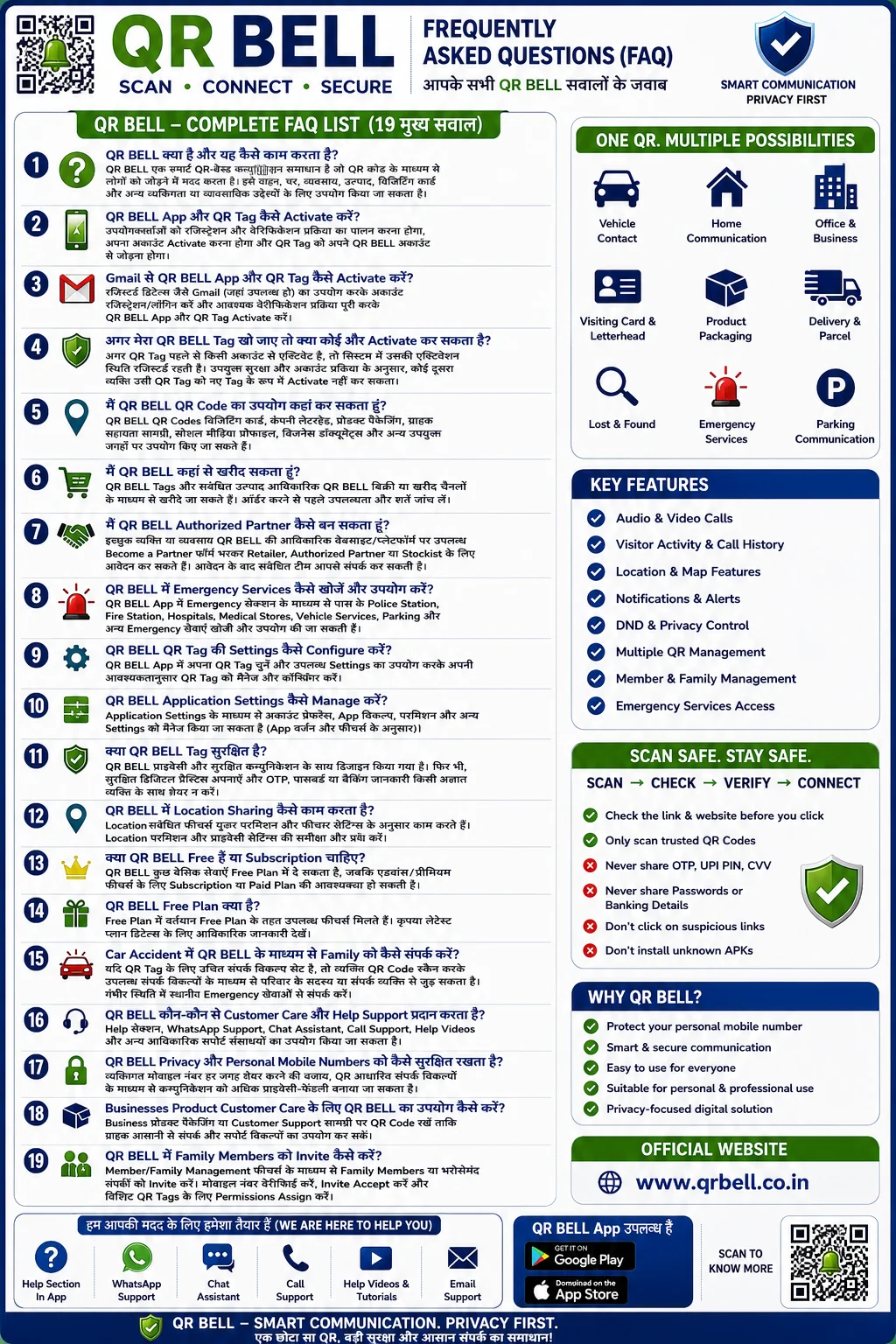
QR BELL एक Smart QR-Based Communication Platform है, जिसे सुरक्षित, आसान और आधुनिक तरीके से लोगों को Connect करने के लिए बनाया गया है। QR BELL का उपयोग Vehicle, Home, Office, Visiting Card, Business, Product Packaging, Emergency Contact और Customer Support जैसे कई उद्देश्यों के लिए किया जा सकता है।
इस ब्लॉग में QR BELL से जुड़े महत्वपूर्ण सवालों के जवाब दिए गए हैं।
1. QR BELL क्या है और यह कैसे काम करता है?
QR BELL एक Smart QR Communication Solution है। QR BELL QR Code को Scan करके उपलब्ध संपर्क और communication options के माध्यम से आसानी से Connect किया जा सकता है।
इसका उपयोग आपकी जरूरत के अनुसार Vehicle, Door, Home, Office, Business, Visiting Card, Product या अन्य जगहों पर किया जा सकता है।
2. QR BELL App और QR Tag को कैसे Activate करें?
QR BELL App और QR Tag को Activate करने के लिए User को Registration और Verification Process पूरा करना होता है। Account Activate होने के बाद QR Tag को QR BELL Account के साथ Connect किया जा सकता है।
3. Gmail से QR BELL App और QR Tag कैसे Activate करें?
जहां उपलब्ध हो, User अपने Registered Gmail या उपलब्ध Account Registration Method के माध्यम से QR BELL Account बना सकता है और आवश्यक Verification Process पूरा करके QR BELL App और Tag को Activate कर सकता है।
4. QR BELL Tag खो जाने पर क्या कोई दूसरा व्यक्ति उसे Activate कर सकता है?
यदि QR BELL Tag पहले से किसी Account के साथ Activated और Registered है, तो उसका Status System में Registered रहता है। किसी दूसरे व्यक्ति द्वारा उसी Tag को नए Tag के रूप में Activate करने की सुविधा QR BELL की लागू Security और Account Process पर निर्भर करती है।
5. QR BELL QR Code कहां-कहां उपयोग किया जा सकता है?
QR BELL का उपयोग कई Personal और Professional Locations पर किया जा सकता है, जैसे:
🚗 Car और Bike
🏠 Home और Door
🏢 Office और Business
💼 Visiting Card
📄 Letterhead और Documents
📦 Product Packaging
📱 Social Media Profiles
🛍️ Customer Support Materials
6. QR BELL कहां से खरीद सकते हैं?
QR BELL Products और QR Tags उपलब्ध Official Sales या Purchase Channels के माध्यम से खरीदे जा सकते हैं। खरीदारी करने से पहले Product Availability और लागू Terms & Conditions की जांच करना जरूरी है।
7. QR BELL Authorized Partner कैसे बनें?
Individuals, Retailers और Businesses QR BELL के साथ Partnership Opportunities के लिए आवेदन कर सकते हैं।
Available Partnership Options में शामिल हो सकते हैं:
Retailer
Authorized Partner
Stockist
Business Partner
Application प्राप्त होने के बाद संबंधित Team उपलब्ध Partnership Terms और Eligibility के अनुसार आगे की प्रक्रिया बता सकती है।
8. QR BELL में Emergency Services कैसे खोजें?
QR BELL App में उपलब्ध Emergency Features के माध्यम से User को Nearby Emergency या आवश्यक Services खोजने में सहायता मिल सकती है।
Available Services में शामिल हो सकते हैं:
Police Station
Fire Station
Hospital
Medical Store
Vehicle Services
Parking
अन्य उपलब्ध Emergency Services
9. QR BELL QR Tag की Settings कैसे Manage करें?
User QR BELL App में अपने संबंधित QR Tag को Select करके उपलब्ध Settings और Configuration Options को अपनी जरूरत के अनुसार Manage कर सकता है।
10. QR BELL Application Settings कैसे Manage करें?
QR BELL App Settings के माध्यम से User उपलब्ध:
Account Preferences
Application Options
Permissions
Privacy Settings
Notification Settings
और अन्य उपलब्ध Features को Manage कर सकता है।
11. क्या QR BELL Tag सुरक्षित है?
QR BELL को Privacy और Secure Communication को ध्यान में रखते हुए डिजाइन किया गया है। हालांकि, सुरक्षित Digital Practices अपनाना हमेशा जरूरी है।
महत्वपूर्ण सुरक्षा सुझाव:
केवल Trusted QR Code और Official Link का उपयोग करें।
OTP कभी किसी के साथ Share न करें।
Password या PIN किसी अनजान व्यक्ति को न दें।
Bank Account या Card Details Share न करें।
किसी Suspicious Link पर Click न करें।
12. QR BELL में Location Sharing कैसे काम करती है?
जहां Location Feature उपलब्ध हो, वहां यह User Permission और Feature Settings के अनुसार काम कर सकती है। User को अपनी Location और Privacy Permissions को अपनी आवश्यकता के अनुसार Manage करना चाहिए।
13. क्या QR BELL Free है या Subscription लेना पड़ता है?
QR BELL में उपलब्ध Services और Features के अनुसार Free Plan और कुछ Advanced या Premium Features के लिए Paid Subscription उपलब्ध हो सकती है।
Available Features, Usage Limits और Charges लागू Plan और Policy के अनुसार अलग हो सकते हैं।
14. QR BELL Free Plan क्या है?
QR BELL Free Plan में Users को उपलब्ध Basic Features और Services का उपयोग करने की सुविधा मिल सकती है। Current Plan में उपलब्ध Features और Limits समय-समय पर लागू QR BELL Policy के अनुसार हो सकते हैं।
15. Car Accident या Emergency में Family Member से कैसे संपर्क किया जा सकता है?
यदि QR BELL Tag में आवश्यक Contact Options और Trusted Contacts पहले से Configure किए गए हैं, तो Emergency Situation में QR Code Scan करके उपलब्ध Contact Options के माध्यम से संबंधित व्यक्ति से संपर्क करने का प्रयास किया जा सकता है।
⚠️ गंभीर Emergency की स्थिति में हमेशा स्थानीय Emergency Services से तुरंत संपर्क करें।
16. QR BELL Customer Care और Support कैसे प्राप्त करें?
QR BELL Users को उपलब्ध Official Support Options के माध्यम से सहायता मिल सकती है, जैसे:
Help Section
WhatsApp Support
Chat Assistant
Call Support
Help Videos
Tutorials
अन्य Official Support Resources
17. QR BELL Privacy और Personal Mobile Number को कैसे Protect करता है?
QR BELL का उद्देश्य ऐसी परिस्थितियों में Smart Communication का विकल्प प्रदान करना है, जहां User अपना Personal Mobile Number सार्वजनिक रूप से Share नहीं करना चाहता।
Available QR-Based Contact Options के माध्यम से Users उपलब्ध Features और Privacy Controls के अनुसार Communication को Manage कर सकते हैं।
18. Businesses QR BELL को Product Customer Care के लिए कैसे उपयोग कर सकते हैं?
Businesses अपने Product Packaging, Customer Support Material या अन्य Professional Locations पर QR BELL QR Code का उपयोग कर सकते हैं।
इससे Customers को उपलब्ध:
Customer Support
Contact Options
Product Communication
Business Assistance
तक पहुंचने का आसान तरीका मिल सकता है।
19. QR BELL में Family Members को कैसे Invite करें?
Available Member या Family Management Features के माध्यम से Users अपने Family Members या Trusted Contacts को Invite कर सकते हैं।
इस Process में उपलब्ध Feature के अनुसार:
Member Details जोड़ना
Mobile Verification
Invitation Accept करना
QR Tag Permissions Manage करना
शामिल हो सकता है।
Additional Frequently Asked Questions
क्या QR BELL को Visiting Card पर लगाया जा सकता है?
हाँ। QR BELL QR Code को Visiting Card पर उपयोग करके उपलब्ध Contact और Communication Options तक आसान पहुंच प्रदान की जा सकती है।
क्या QR BELL को Product Packaging पर इस्तेमाल किया जा सकता है?
हाँ। QR BELL को Product Packaging, Customer Support Materials और अन्य Suitable Business Locations पर उपयोग किया जा सकता है।
क्या एक QR BELL QR Code में Multiple Family Members जोड़े जा सकते हैं?
जहां QR BELL के Available Features और Account Configuration में Support हो, वहां Multiple Trusted Members को QR Tag के साथ Manage किया जा सकता है।
किसी Member को Specific QR Tag की Permission कैसे दें?
Member Invitation Accept होने के बाद QR Tag Owner उपलब्ध QR Settings और Member Management Options के माध्यम से Permissions को Manage कर सकता है।
क्या QR BELL Business के लिए उपयोग किया जा सकता है?
हाँ। QR BELL का उपयोग कई Business Purposes के लिए किया जा सकता है, जैसे:
Business Communication
Customer Support
Product Packaging
Visiting Cards
Letterheads
Office Communication
QR BELL के मुख्य फायदे
✅ Smart QR Communication
✅ Privacy-Focused Connectivity
✅ Personal Number Share किए बिना Communication Options
✅ Audio / Video Communication की उपलब्ध सुविधाएं
✅ Visitor Activity और Available Features
✅ Location-Related Features
✅ Emergency-Related Support Options
✅ Vehicle, Home और Business के लिए उपयोग
✅ Family और Trusted Contact Management
✅ आसान और Modern QR-Based Experience
QR BELL क्यों उपयोग करें?
आज के Digital World में Privacy और आसान Communication दोनों महत्वपूर्ण हैं। QR BELL एक ऐसा Smart QR-Based Platform है जो Personal और Professional Communication को अधिक Organized और Convenient बनाने के लिए उपलब्ध Features और Options प्रदान करता है।
चाहे आप अपने Vehicle पर QR Tag लगाना चाहते हों, Home या Office के लिए Smart Contact Solution चाहते हों, Visiting Card को Digital बनाना चाहते हों या Business Customer Support को बेहतर बनाना चाहते हों, QR BELL विभिन्न उपयोगों के लिए एक आधुनिक QR-Based Communication Solution प्रदान करता है।
Conclusion
QR BELL एक Smart QR Communication Solution है जिसे विभिन्न Personal, Business और Professional Communication Needs के लिए उपयोग किया जा सकता है। QR BELL App, QR Tag, Privacy Features, Family Management, Business Communication, Emergency-Related Options और Customer Support जैसे विषयों को समझकर User उपलब्ध Features का बेहतर उपयोग कर सकते हैं।
Safe रहें, Smart तरीके से Connect करें और हमेशा केवल Trusted QR Codes एवं Official Links का ही उपयोग करें।
Read Article