 QRBELL Team
Nearest Parking Finder: Find Car & Bike Parking with Hourly Parking Rates
Finding a safe and affordable parking space can be difficult, especially in busy markets, metro areas, railway stations, hospitals, shopping malls, and city centres. Drivers often spend valuable time searching for nearby parking and may not know the parking charges before reaching the location.
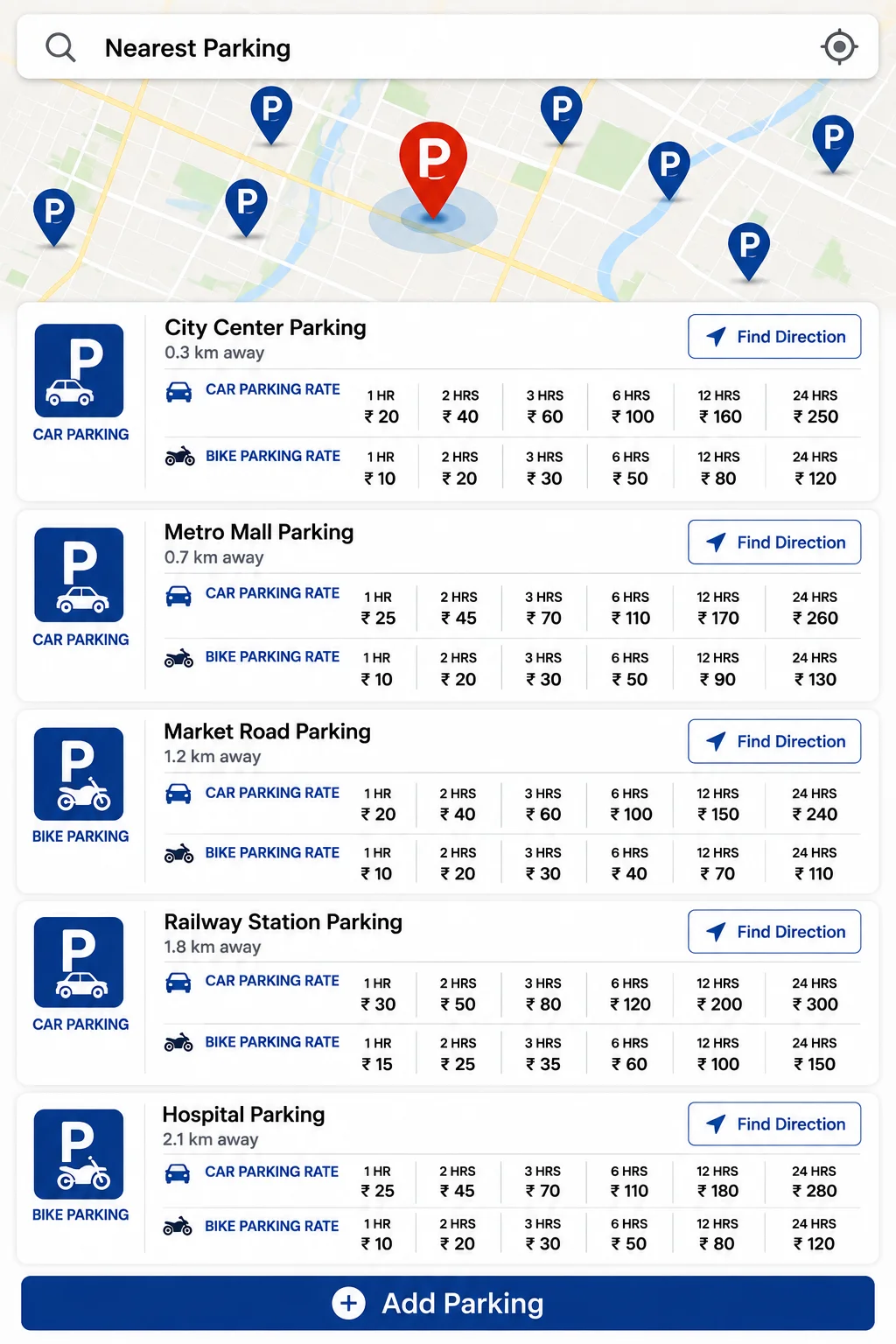
A Nearest Parking Finder feature can make this process easier by helping users search for nearby Car Parking and Bike Parking, view available parking locations, check distance, see parking rates according to hours, and get directions to the selected parking location.
Search for Nearest Parking
Users can simply search for Nearest Parking to view parking locations available around their current area.
The parking list can display useful information such as:
- Parking location name
- Distance from the user's location
- Car parking availability
- Bike parking availability
- Hourly parking rates
- Different charges based on parking duration
- Find Direction option
- Add Parking option
This helps users compare nearby parking options before travelling to the parking location.
Car Parking Rates According to Hours
Different parking locations may have different rates for cars. The parking information can display charges based on the number of hours a vehicle will remain parked.
For example, users may be able to view rates for:
- 1 Hour Parking
- 2 Hours Parking
- 3 Hours Parking
- 6 Hours Parking
- 12 Hours Parking
- 24 Hours Parking
This makes it easier for car owners to estimate the parking cost before arriving at the location.
Instead of searching manually for parking charges, users can compare the available parking rates directly through the parking information screen.
Bike Parking Rates According to Hours
Bike and two-wheeler parking charges can also vary depending on the parking location and duration.
The platform can display separate Bike Parking Rates for different durations, such as:
- 1 Hour
- 2 Hours
- 3 Hours
- 6 Hours
- 12 Hours
- 24 Hours
Separate pricing information for cars and bikes helps users select the most suitable parking location according to their vehicle and required parking duration.
Find Direction to the Parking Location
After selecting a suitable parking location, users can use the Find Direction option.
This feature can help users navigate towards the selected parking location without manually searching for its address.
The parking card can display the approximate distance, making it easier to compare options such as:
City Center Parking – 0.3 km away
Metro Mall Parking – 0.7 km away
Market Road Parking – 1.2 km away
Railway Station Parking – 1.8 km away
Hospital Parking – 2.1 km away
Users can select the parking location that is convenient according to distance and parking charges.
Add Your Own Parking
One of the important features of the platform can be the Add Parking option.
If a parking owner, business, society, commercial property, mall, shop, or individual has a parking space available, they can add their parking location to the platform.
The + Add Parking option can help parking owners provide information about their parking facility.
They may be able to add details such as:
- Parking location name
- Parking address
- Location on map
- Car parking availability
- Bike parking availability
- Parking charges
- Hourly rates
- Daily rates
- Available parking timings
This can help make more parking locations discoverable for people searching nearby.
Benefits of a Smart Parking Finder
A smart parking search system can provide several benefits for vehicle owners.
Save Time
Users can search nearby parking instead of driving around and manually looking for a parking space.
Compare Parking Rates
Car and bike parking rates can be viewed according to different time durations.
Find Nearby Locations
Distance information helps users select a nearby parking location.
Easy Navigation
The Find Direction option can help users reach the selected parking location.
Car and Bike Parking Information
Separate parking details can make the information more useful for different vehicle owners.
Parking Owner Participation
Parking owners can use the Add Parking option to make their parking location discoverable.
Useful for Different Locations
A Nearest Parking Finder can be useful in many places, including:
- Shopping Malls
- Markets
- Metro Stations
- Railway Stations
- Hospitals
- Offices
- Business Areas
- Residential Societies
- Tourist Locations
- Event Venues
- Commercial Buildings
- Public Parking Areas
Parking information can help drivers plan their visit more efficiently.
How Does the Parking Search Feature Work?
The basic user journey can be simple:
Step 1: Search Nearest Parking
The user searches for parking near their location.
Step 2: View Nearby Parking Locations
Multiple available parking locations can appear on the map and in the parking list.
Step 3: Check Distance
The user can compare which parking location is nearest.
Step 4: Check Car or Bike Parking Rates
The user can view parking charges according to the required number of hours.
Step 5: Select a Suitable Parking Location
The user chooses the parking location according to convenience and rates.
Step 6: Click Find Direction
The navigation option helps the user proceed towards the selected parking location.
Step 7: Add Parking
Parking owners can use the Add Parking option to provide information about their own parking facility.
Frequently Asked Questions (FAQ)
What is a Nearest Parking Finder?
A Nearest Parking Finder is a feature designed to help users search for parking locations near their current location and view available parking-related information.
Can I See Car Parking Rates?
Yes. Parking information can display car parking charges according to different parking durations, depending on the parking facility.
Can I See Bike Parking Rates?
Yes. Separate bike parking rates can be displayed for different durations where such information is available.
Can I Check Parking Rates for Multiple Hours?
Yes. Parking charges can be organised according to durations such as 1 hour, 2 hours, 3 hours, 6 hours, 12 hours, and 24 hours.
What Does Find Direction Do?
The Find Direction option helps users navigate towards the selected parking location.
Can Parking Owners Add Their Own Parking Location?
Yes. The Add Parking option can allow parking owners or authorised persons to submit their parking location and relevant parking details.
Can I Search for Parking Near a Metro Station?
Yes. Users can search nearby parking locations around metro stations and other popular locations where parking information is available.
Is This Useful for Car and Bike Owners?
Yes. The feature can provide separate parking information for both cars and bikes.
Why Is Parking Rate Information Important?
Parking rates help users estimate the cost of parking before selecting a location.
Conclusion
A Nearest Parking Finder with Hourly Car and Bike Parking Rates can make parking search easier and more convenient. Users can search nearby parking locations, check the distance, compare hourly rates, view separate charges for cars and bikes, and use the Find Direction option.
At the same time, the Add Parking feature can provide an opportunity for parking owners to add and share information about their parking facilities.
Smart parking information can help users save time, make better parking decisions, and find suitable parking locations more easily.